In the fast-paced world of web development and api testing, having reliable placeholder test data is crucial. Whether you’re building a new feature, testing a json api endpoint, or just need some sample json data for your frontend, dummy json online tools can be a lifesaver. This guide will walk you through how to effectively use and benefit from these indispensable json generator resources.
Why Use dummy json online and test data?
Using online tools to generate dummy data or a fake api offers numerous advantages for developers in 2025:
- Speed and Efficiency: Quickly generate data and complex json structures without writing tedious manual code.
- API Prototyping: Use mock apis to simulate a server response before the backend is fully developed.
- Comprehensive Testing: Create a variety of test data scenarios, including edge cases, to see how your app handles a specific response body.
- Consistency: A json generator ensures consistent fake json formats, which is crucial for predictable json online environments.
Top Services for json api and fake json Generation
jsonplaceholder: The Quick mock apis Solution
jsonplaceholder is a free online json service you can use whenever you need some json dummy data. It provides a real json api that handles a standard request and returns a predictable response. It is perfect for testing a create method (POST) or fetching a list of fake posts.
mockaroo: Advanced dummy data for json online
For more complex needs, mockaroo allows you to create customized dummy data schemas. It acts as a powerful json generator where you can define fields like names, emails, and addresses, and then generate data in a bulk json format.
How to Generate Data Using a json generator
Getting a fake response body is typically straightforward. Most online generators follow this general approach:
- Define Your Structure: Specify the fields for your json dummy object.
- Select Your Data Types: Choose from names, dates, or custom strings to populate your test data.
- Send a Request: Use the provided URL to trigger a response from the server.
- Parse the Body: Integrate the json data into your application’s state or body for rendering.
Pro Tip: If you prefer working locally, you can use json-server to turn a local fake json file into a full-fledged fake api on your own machine.
Best Practices for Using dummy json and mock apis
- Mimic Real Data Closely: While using fake data, try to make the response body as close to your production server as possible to avoid unexpected issues.
- Vary the Response: Don’t just use identical objects. Use mockaroo to generate data with variations to test different UI states.
- Test Errors: Use mock apis to simulate a 404 or 500 response to ensure your application doesn’t crash.
- Sync with your Team: Share your jsonplaceholder or json online configurations so everyone is testing against the same json data structure.
Conclusion
Leveraging dummy json online generators significantly enhances development and testing workflows. By providing a quick and flexible way to create test data, these tools enable faster prototyping and more robust applications. Whether you are using jsonplaceholder, mockaroo, or a local json-server, integrating a fake api into your toolkit will streamline your development process.
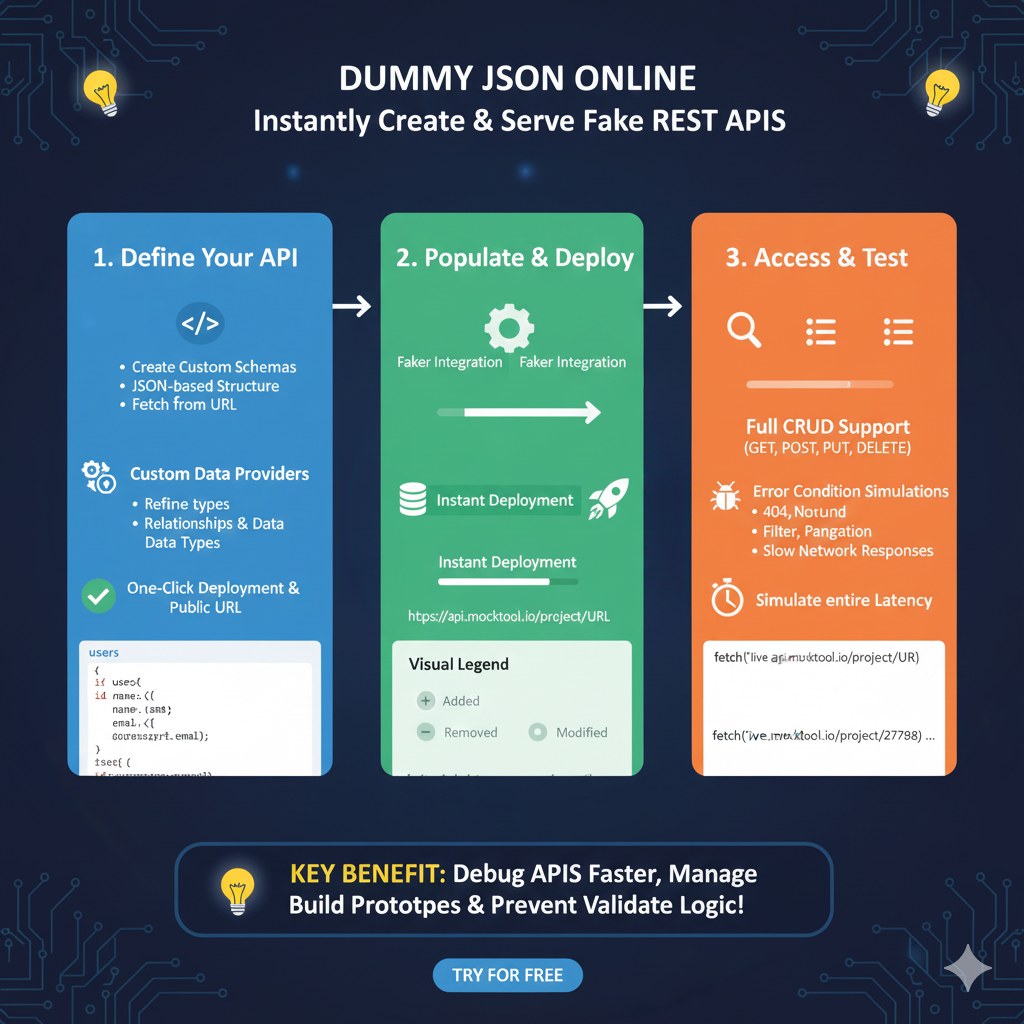
Mock API Development Workflow
This workflow allows frontend and backend teams to work in parallel by simulating a functional server environment:
1. Define Your API (Blue)
The first phase involves setting up the data structure and access points:
- Schema Creation: Build custom, JSON-based structures or fetch existing definitions from a URL.
- Custom Data Providers: Refine field types and establish complex relationships between different data entities.
- Public URL: Use one-click deployment to generate a live, public URL that can be used immediately in your code.
2. Populate & Deploy (Green)
This phase focuses on generating realistic data and launching the service:
- Faker Integration: Automatically populate your API with realistic placeholder data like names, emails, and addresses.
- Instant Deployment: Quickly push your mock server live to a dedicated endpoint (e.g.,
api.mocktool.io/project/URL). - Visual Tracking: Use the Visual Legend to track changes in your data structure, with color-coded indicators for Added, Removed, and Modified fields.
3. Access & Test (Orange)
The final phase details how to interact with and stress-test the mock API:
- Full CRUD Support: The API supports all standard HTTP methods including GET, POST, PUT, and DELETE.
- Error Condition Simulations: Validate your app’s error handling by simulating 404 Not Found errors, pagination, and filtering.
- Network Latency: Test user experience under poor conditions by using the Simulate entire Latency feature to mimic slow network responses.
learn for more knowledge
Mykeywordrank-> small seo tool for keyword rank checking and local rank checker – keyword rank checker
json web token-> Mastering OAuth2 JWT and OAuth Authentication Introduction to OAuth2 JWT and Identity Security – json web token
Json Compare ->JSON File Compare Online: The Ultimate JSON Compare Online and JSON Diff Guide for Files – online json comparator
json parser-> How to Parse JSON in C with jsmn parser: A Step-by-Step Guide for SEO – json parse
Leave a Reply