How to Generate Realistic Dummy user data json for Development and Testing
In the fast-paced world of web development, mobile app creation, and software testing, a common challenge is the need for realistic, yet non-sensitive, data. Whether you’re building a new feature, testing a json api, or showcasing a prototype, relying on live users can be risky. This is where dummy user data json and free fake rest api services become an invaluable asset for any developer.
Why You Need dummy user data json for mock apis
Using dummy data and fake users serves several critical purposes in a modern data workflow:
- Development & Prototyping: Quickly populate your UI or backend with json data without waiting for a live server.
- Testing: Create various scenarios to test edge cases, performance, and functionality of your apis.
- Demonstrations: Showcase your application’s capabilities to stakeholders with compelling, structured user data.
- Privacy & Security: Avoid using or exposing sensitive user information by using fake json during development.
Methods to Generate Data and Use Fake User Data
1. Placeholder JSON Data via JSONPlaceholder
JSONPlaceholder is the most popular free fake rest api for developers. It allows you to create a request to a mock endpoint and receive a response in seconds. It is perfect when you need a quick json dummy for comments, todos, or users.
- Pros: No setup required; just use the console or
fetch(). - Common Endpoints:
/users,/posts,/comments.
2. JSON Server and Local Dummy JSON Files
If you need dummy json files of various sizes or specific structures, you can use json server. By hosting a simple json file on your local machine or github, you can turn it into a full-featured fake api.
- Setup: Point the json server to your local user data file.
- Flexibility: You can customize every email, id, and key to match your production environment.
3. Programmatic Generation for Fake Users
For larger, more complex json data sets, programming libraries like Faker (for Node.js or Python) are the most powerful way to generate data.
JavaScript Example (Node.js):
JavaScript
// Using a generator to create dummy user data json
const users = [];
for (let i = 0; i < 10; i++) {
  users.push({
    id: i,
    email: `user${i}@example.com`,
    name: "Fake User"
  });
}
console.log(JSON.stringify(users));
Best Practices for Structuring User Data
When creating your dummy data structure, consider the following to ensure it works with your json api:
- Descriptive Keys: Use standard naming conventions for your user fields.
- Realistic Types: Ensure your fake json uses strings for email, numbers for IDs, and booleans for status flags.
- Consistency: If you are using csv to json conversion tools, ensure the mapping remains consistent across various sizes of data.
Conclusion
Generating realistic dummy user data json is a fundamental skill for any developer. By leveraging jsonplaceholder for quick tests, json server for local mock apis, and programmatic libraries to generate data, you can significantly streamline your workflow and protect user privacy. Start incorporating these fake api techniques into your github projects today to build more robust, well-tested applications!
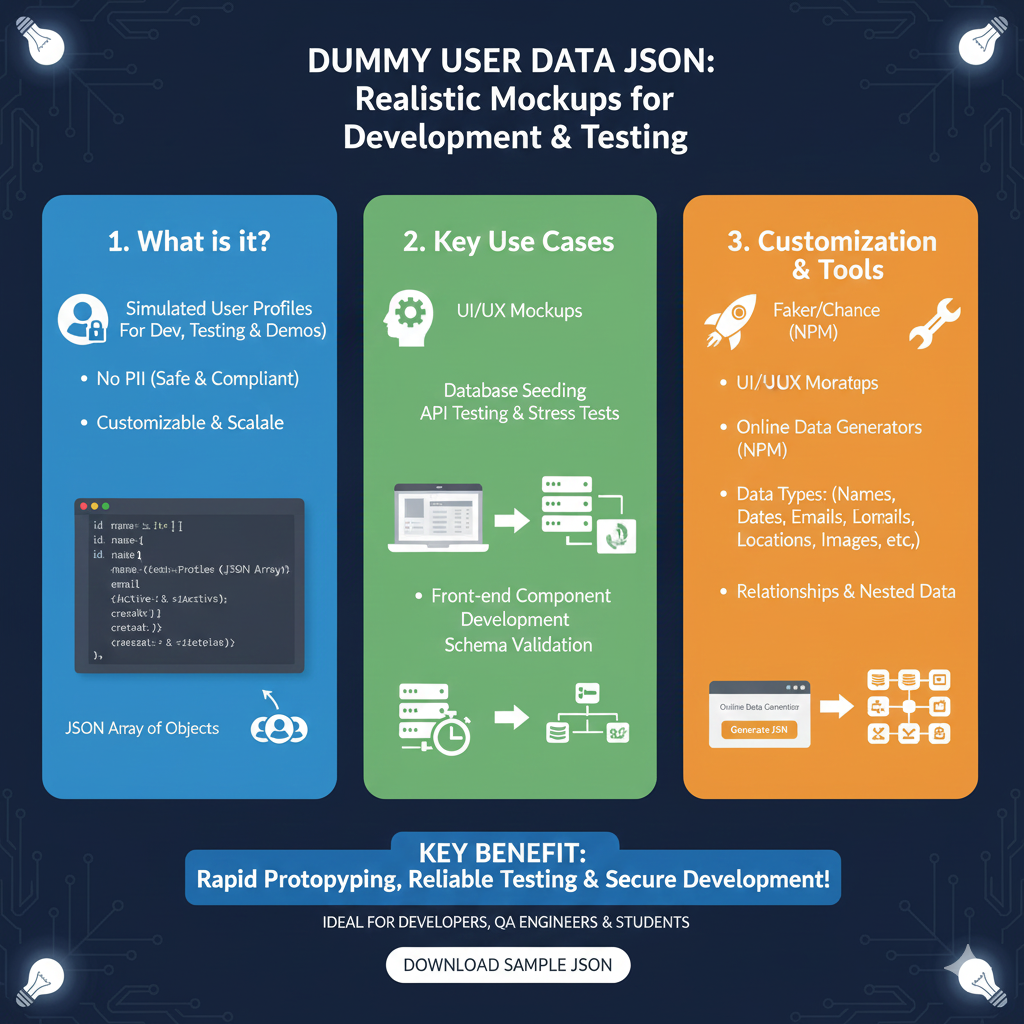
The infographic titled “DUMMY USER DATA JSON: Realistic Mockups for Development & Testing” provides a comprehensive guide for developers and QA engineers on using simulated datasets to accelerate the software building process.
🛠️ The Dummy Data Ecosystem
The graphic organizes the utility of synthetic user profiles into three core pillars:
1. What is it? (Blue)
This section defines the nature of dummy user data:
- Simulated User Profiles: These are datasets designed specifically for development, testing, and product demonstrations.
- No PII (Safe & Compliant): Because the data is fake, it contains no Personally Identifiable Information, making it safe for use in non-secure environments.
- Customizable & Scalable: Users can generate small sets or massive arrays to fit the specific needs of their application.
- Structure: It is typically delivered as a JSON Array of Objects, containing attributes like names, IDs, and email addresses.
2. Key Use Cases (Green)
This module details how these datasets are applied in real-world technical workflows:
- UI/UX Mockups: Designers use this data to populate interfaces to see how real-world information will look in a layout.
- Database Seeding: Developers use it to populate empty databases for testing.
- API & Stress Testing: High volumes of dummy data are essential for testing how systems handle large traffic loads.
- Front-end Development: Enables independent development of front-end components even if the back-end is not yet ready.
- Schema Validation: Helps ensure that incoming data structures match the required application format.
3. Customization & Tools (Orange)
This pillar highlights the tools and complexity available for generating realistic mockups:
- Standard Tools: Mentions popular NPM packages like Faker and Chance for generating realistic-sounding data.
- Diverse Data Types: Capability to generate everything from Names and Dates to Emails, Locations, and Images.
- Complex Data Architectures: Supports Relationships & Nested Data, allowing for complex hierarchies that mimic real databases.
- Online Generators: Provides a visual flow of how online tools generate a JSON structure from specified parameters.
learn for more knowledge
Mykeywordrank-> SEO Search Engine Optimization: Mastering the Search Engine for Traffic – keyword rank checker
json web token->jwt spring boot: How to Secure Your spring boot APIs with jwt authentication and jwt token – json web token
Json Compare ->How to Effectively Use a JSON Compare Tool for Data Analysis – online json comparator
json parser->How to Parse json file parser- A Comprehensive Guide for Developers – json parse
Leave a Reply