In modern web development, front-end and backend teams often work in parallel. However, the front-end frequently depends on the backend apis being fully functional. This dependency can slow down projects, introduce integration bugs, and make isolated testing difficult. This is where fake api post requests and mock api setups come into play.
By simulating a fake api server or a specific api endpoint, developers can:
- Unblock Frontend Development: Proceed with UI/UX implementation without waiting for the actual api implemented on the server.
- Enable Isolated Testing: Test front-end logic, error handling, and data submission flows for users, products, or todos independently.
- Accelerate Prototyping: They let you create fake versions of your json api to demonstrate features without the overhead of a full fake rest api server.
- Simulate Edge Cases: Easily test various success and failure scenarios for every api endpoint (e.g., validation errors, network issues).
Popular Tools and Methods for fake api post Requests
1. Online mock api Services (e.g., JSONPlaceholder & reqres)
Online services like reqres and JSONPlaceholder provide a free online rest api that is ready-to-use. These apis allow you to perform all CRUD operations, including a post request, for common resources like posts, users, and comments.
- Pros: Extremely easy and fast setup for testing; no local server configuration required.
- Cons: Limited customization; not suitable for complex application states or custom data structures.
Example: How to use fake api post with await fetch To send a post request to a free fake rest api like JSONPlaceholder, you can use the following logic:
JavaScript
const response = await fetch('https://jsonplaceholder.typicode.com/posts', {
  method: 'POST',
  body: JSON.stringify({ title: 'foo', body: 'bar', userId: 1 }),
  headers: { 'Content-Type': 'application/json' }
});
const res = await response.json();
console.log(res); // body json response
2. Local json server (The full fake rest api Solution)
For more control, a json server is the best choice to create a fake api that runs locally. It allows you to use fake data from a local file and treat it like a real database.
- Pros: Full control over your fake json, supports custom endpoints, and works offline.
- Cons: Requires local installation of the json server package.
Step-by-Step: Setting Up a json server
- Install:
npm install -g json-server - Create db.json: Define your posts, users, and products.
- Start:
json-server --watch db.json
Now you can send a fake api post to http://localhost:3000/posts, and the json server will actually store the new data in your file.
3. fake store APIs and mock apis (MSW)
If you are building an e-commerce project, you might use a fake store api to simulate products and cart actions. For more robust testing, Mock Service Workers (MSW) intercept network requests at the service worker level, allowing you to return a mock res without the request ever leaving the browser.
- Use fake handlers to simulate a limit on results or specific api endpoint behaviors.
- Intercept fake apis calls and return custom body json data.
Best Practices for mock apis and fake api post Testing
- Keep Mocks Realistic: Ensure your mock res closely resembles what a real backend would return, including status codes and headers.
- Organize by Resource: Categorize your endpoints by posts, users, todos, and products to keep the fake api clean.
- Simulate Latency: Use a limit or delay in your json server to see how your UI handles loading states.
- Version Your Fake Json: Store your mock files in version control so the whole team has the same fake api setup.
Conclusion
Whether you use reqres for a quick post test or a json server for a full fake rest api, faking your apis is an invaluable strategy. By leveraging a mock api, you can significantly accelerate your development cycle and ensure your projects are robust before the real backend is even finished.
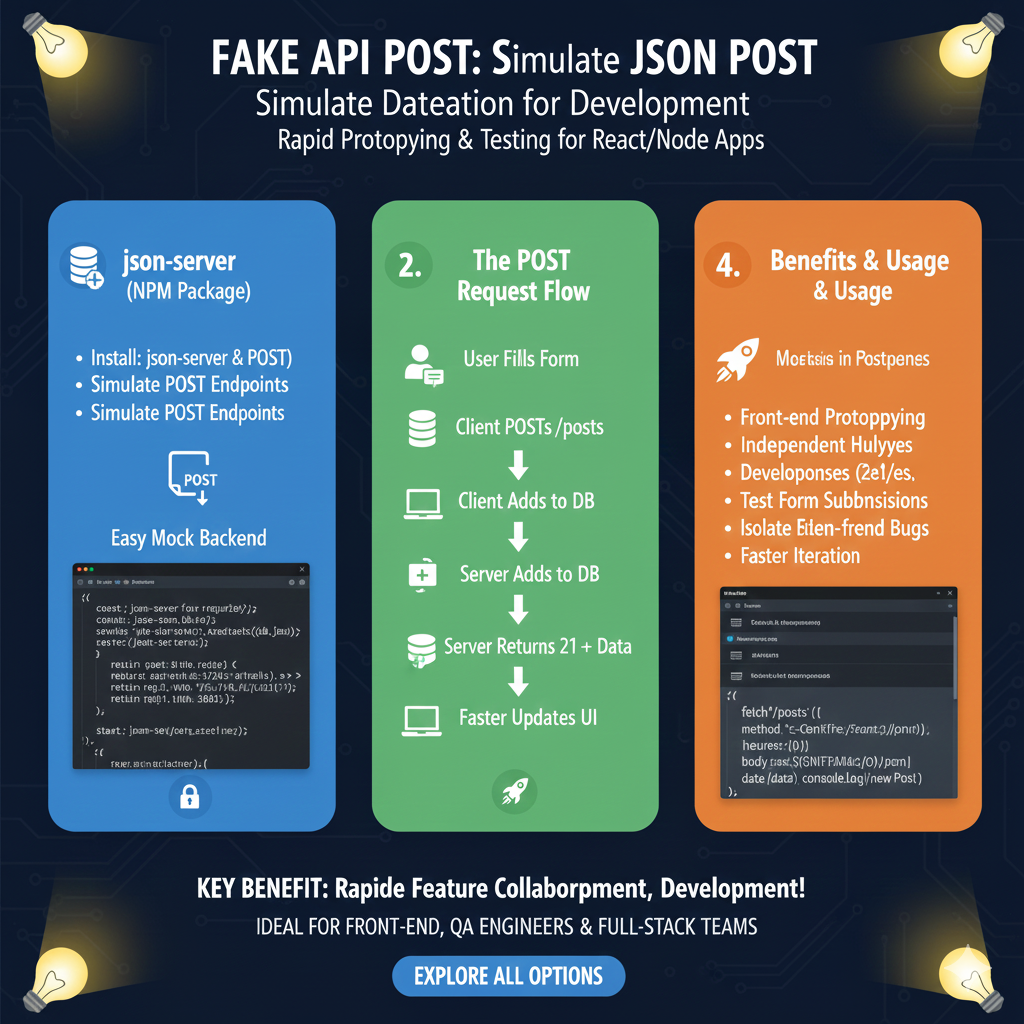
Mastering Data Simulation with Fake API POST
This guide outlines the tools, the logical flow of data, and the primary benefits of using mock POST requests during the development lifecycle.
1. Setup: json-server (Blue)
This module focuses on establishing a local, functional backend for simulating data entry:
- Installation: Demonstrates how to install
json-serverto manage mock POST endpoints. - Easy Mock Backend: Provides a simple environment to Simulate POST Endpoints without needing a production-ready database.
- Implementation: Displays a code snippet for initializing a server that can handle incoming data payloads.
2. The POST Request Flow (Green)
This section illustrates the step-by-step lifecycle of a data submission request:
- User Interaction: The process starts when a User Fills a Form on the frontend.
- Data Submission: The Client POSTs to
/posts, sending the new data to the mock server. - Data Processing: The Server adds the data to the mock DB and returns a success status (such as a 201 Created) along with the saved data.
- UI Update: The cycle completes with Faster Updates to the UI, reflecting the newly added information immediately.
3. Benefits & Usage (Orange)
The final pillar explains why mock POSTing is a critical practice for modern development teams:
- Rapid Development: Facilitates Front-end Prototyping and Independent Development, allowing UI teams to work before the real backend is ready.
- Reliability: Ideal for Testing Form Submissions and isolating Frontend Bugs from backend issues.
- Efficiency: Enables Faster Iteration and better collaboration between feature teams.
- Mocking Tools: Mentions the use of platforms like Postman for even more advanced simulation and testing.
learn for more knowledge
Mykeywordrank-> Search for SEO: The Ultimate Guide to Keyword Research and SEO Site Checkup – keyword rank checker
json web token->jwt react Authentication: How to Secure Your react app with jwt authentication – json web token
Json Compare ->compare json online free: Master json compare online with the Best json compare tool and online json Resources – online json comparator
json Parser->json parse use: A Developer’s Guide to json parse, json.parse, and parse json strings – json parse
Leave a Reply