In the fast-paced world of software development, testing is paramount. However, relying solely on real APIs for every test can introduce bottlenecks, increase costs, and create unpredictable environments. This is where fake APIs to test your applications come into play, revolutionizing how developers and QAs approach testing.
If you’re wondering “how to use fake API effectively,” you’ve come to the right place. This guide will walk you through the importance, benefits, and practical steps for integrating fake APIs into your development and testing workflow.
What is a Fake API?
A fake API, often referred to as a mock API or a stub API, is a simulated version of a real API. It mimics the behavior of a genuine API by responding to requests with predefined data, status codes, and latency, without actually connecting to the live backend service. The primary purpose of a fake API is to isolate the component being tested from external dependencies.
Why Use Fake APIs for Testing?
Using fake APIs to test offers a multitude of benefits that streamline the development and testing process:
Independent TestingAllows frontend and backend teams to work in parallel without waiting for the other’s API to be ready. Frontend developers can test UI interactions and data display even if the backend is still under development.
Reliability and ConsistencyEliminates the unpredictability of external services. Fake APIs provide consistent responses, making tests more reliable and reproducible, free from network issues or third-party service outages.
Cost ReductionAvoids incurring costs associated with making requests to paid third-party APIs during extensive testing cycles.
Speed and EfficiencyTests run significantly faster as there’s no actual network latency or database operations involved. This leads to quicker feedback loops and a more agile development process.
Handling Edge CasesEasily simulate various scenarios, including error responses (e.g., 404, 500), slow responses, and specific data permutations, which might be difficult or risky to reproduce with a real API.
How to Use Fake APIs: Practical Approaches
There are several ways and tools available when you want to learn how to use fake API for your projects:
1. Simple JSON Files
For very basic needs, you can serve static JSON files locally. This is a quick way to get started, especially for frontend development.
// Example data.json
{
  "id": 1,
  "name": "Test Product",
  "price": 29.99
}
2. In-Memory Mocking Libraries
Many programming languages and frameworks offer libraries to mock API responses directly within your test suite. This is common in unit and integration testing.
- JavaScript: Mock Service Worker (MSW), Nock, Jest Mocks
- Python: responses, unittest.mock
- Java: Mockito, WireMock
Example using Mock Service Worker (MSW) in JavaScript:
// handlers.js
import { rest } from 'msw';

export const handlers = [
  rest.get('/api/products/:id', (req, res, ctx) => {
    const { id } = req.params;
    return res(
      ctx.status(200),
      ctx.json({
        id: id,
        name: `Product ${id}`,
        description: 'This is a mocked product.',
      })
    );
  }),
  rest.post('/api/products', (req, res, ctx) => {
    return res(
      ctx.status(201),
      ctx.json({ message: 'Product created successfully', data: req.body })
    );
  }),
];
3. Dedicated Mock API Servers
For more complex scenarios, simulating full API endpoints with tools that run as separate servers is ideal. These tools often provide a UI for defining endpoints, responses, and even dynamic behavior.
- JSONPlaceholder: A free online REST API that returns fake data. Perfect for quick prototypes or learning.
- Mockoon: A desktop application and CLI for creating local mock APIs. Highly customizable with advanced features.
- WireMock: A robust tool for HTTP mocking, useful for integrating testing and service virtualization.
- Postman Mocks: Allows you to create mock servers directly within Postman based on your collections.
Best Practices for Using Fake APIs
To maximize the benefits of using fake APIs to test, consider these best practices:
- Keep Mocks Up-to-Date: Ensure your fake API definitions reflect the current real API specifications. Outdated mocks can lead to false positives.
- Cover All Scenarios: Create mocks for successful responses, various error states (4xx, 5xx), empty data sets, and edge cases.
- Version Control Your Mocks: Store your mock configurations or code in your version control system alongside your application code.
- Integrate into CI/CD: Automate the use of fake APIs in your continuous integration and continuous deployment pipelines to ensure consistent testing.
- Start Simple, Scale as Needed: Begin with basic mocks and introduce more sophisticated tools or techniques as your project’s needs grow.
Conclusion
Adopting fake APIs to test your applications is a powerful strategy for building more resilient, faster, and cost-effective software. By understanding how to use fake API tools and methodologies, developers and testers can significantly improve their workflow, reduce dependencies, and deliver higher-quality products. Embrace mock APIs and transform your testing approach today!
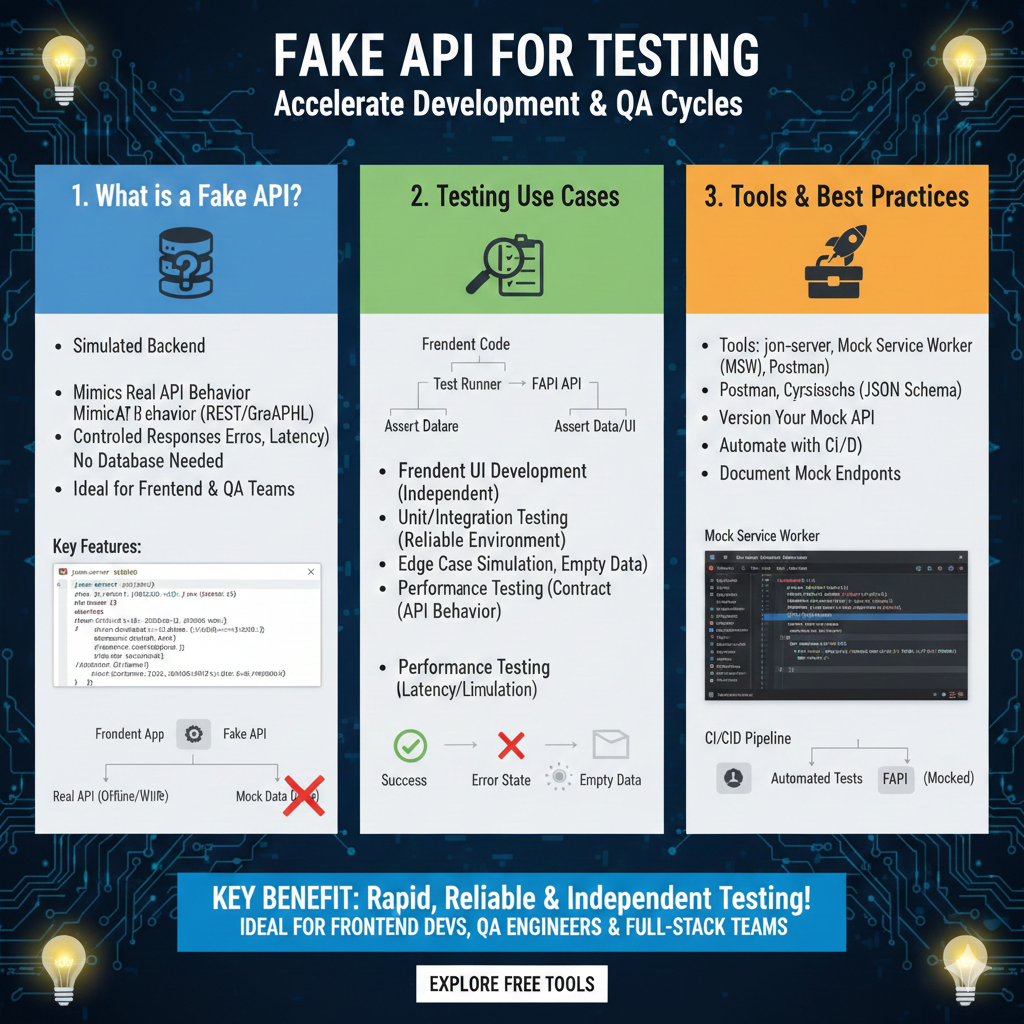
The infographic titled “FAKE API FOR TESTING: Accelerate Development & QA Cycles” provides a technical roadmap for using simulated backends to decouple frontend development from backend production.
🧪 Streamlining QA and Development Cycles
This guide is structured into three modules that define fake APIs, explore their primary testing use cases, and recommend industry-standard tools:
1. What is a Fake API? (Blue)
This section introduces the concept of a simulated backend environment:
- Definition: It is a Simulated Backend that mimics real API behavior, including REST and GraphQL protocols.
- Behavioral Control: Allows developers to create Controlled Responses, including specific errors and artificial latency.
- Infrastructure: Requires No Database Needed, making it an ideal lightweight solution for Frontend & QA Teams.
- Visual Logic: Shows a Frontend App connecting to a Fake API to receive Mock Data even when the real API is offline or unavailable.
2. Testing Use Cases (Green)
This module details how fake APIs facilitate different levels of software verification:
- Independent Development: Enables Frontend UI Development to proceed without waiting for backend completion.
- Reliable Testing: Provides a stable environment for Unit and Integration Testing.
- Boundary Testing: Simplifies Edge Case Simulation, such as testing how the UI handles Empty Data or Error States.
- Performance Analysis: Facilitates Performance Testing by simulating specific API behaviors and latency.
3. Tools & Best Practices (Orange)
The final pillar outlines the ecosystem of tools and automation strategies for mock APIs:
- Recommended Tooling: Lists essential tools like json-server, Mock Service Worker (MSW), and Postman.
- Validation: Suggests using JSON Schema tools like Cyrsisschs for structural verification.
- Maintenance: Recommends developers Version Your Mock API and Document Mock Endpoints for team clarity.
- Automation: Highlights the importance of CI/CD Pipeline integration, where Automated Tests run against a mocked FAPI.
learn for more knowledge
Mykeywordrank-> Search for SEO: The Ultimate Guide to Keyword Research and SEO Site Checkup – keyword rank checker
json web token->jwt react Authentication: How to Secure Your react app with jwt authentication – json web token
Json Compare ->compare json online free: Master json compare online with the Best json compare tool and online json Resources – online json comparator
Json Parser ->How to Effectively Use a JSON Parser API: A Comprehensive Guide – json parse
Leave a Reply