In the world of web development and software testing, having realistic yet dummy data is crucial. Whether you’re building a new user interface, testing api endpoints, or prototyping a database schema, working with fake data json allows you to proceed without the complexities of a live system.
Using a free fake rest api or a full fake rest api can unblock your front-end team and ensure your code is ready for production. This guide will walk you through various methods to generate mock json data efficiently.
Why You Need a free fake rest api and json data?
- Prototyping: Quickly visualize how your application will look and feel with a fake api response.
- Testing: Create diverse test cases using a json mock for edge scenarios and validation.
- Development: Work on front-end features without waiting for back-end apis to be fully ready by using a free json api.
- Performance Testing: Simulate dummy json files of various sizes to check application performance and server load.
- Privacy: Avoid using sensitive real user data during development by choosing to generate fake users and companies.
Methods for Generating fake data json
1. Online mock json Generators
Numerous free online rest api tools allow you to quickly generate fake custom json data based on your requirements. These data generator tools often provide user-friendly interfaces where you can define fields, data types (names, emails, addresses, numbers), and the number of records.
- How to use fake generators (e.g., Mockaroo, JSON Generator):
- Define your json data schema (field names and types).
- Specify the number of rows/records (you can create dummy json files in various sizes).
- Download the placeholder json data or access it via a fake api url.
2. Using the faker api (JavaScript/Node.js Example)
For more control and integration into your development workflow, the faker api (specifically @faker-js/faker) is the industry standard to generate mock objects.
Generating Fake JSON with Faker.js
JavaScript
import { faker } from '@faker-js/faker';

function createRandomUser() {
  return {
    id: faker.string.uuid(),
    username: faker.internet.userName(),
    email: faker.internet.email(),
    company: faker.company.name(), // Generate fake companies
    registeredAt: faker.date.past(),
  };
}

// Create a list of 5 users
const users = faker.helpers.multiple(createRandomUser, { count: 5 });
console.log(JSON.stringify(users, null, 2));
3. Using Python to generate fake mock json
Python developers can leverage the faker api library to create dummy data for users, companies, and more.
Python
from faker import Faker
import json

fake = Faker()

def create_random_user():
    return {
        "id": fake.uuid4(),
        "username": fake.user_name(),
        "email": fake.email(),
        "company": fake.company(),
        "address": fake.address()
    }

# Generate mock json for 5 users
users = [create_random_user() for _ in range(5)]
print(json.dumps(users, indent=2))
Best Practices for Using a json mock generator
| Practice | Why it Matters |
| Vary Your Data | Ensure your fake data covers long strings, empty fields, and different data types. |
| Use Realistic Values | While fake, the json data should mimic the structure of your real response to prevent misleading tests. |
| Automate with a Server | For larger projects, integrate a full fake rest api into your build or test scripts. |
| Version Control | Keep your placeholder json data files under version control for team consistency. |
Conclusion
Generating fake data json is an indispensable skill for modern developers and testers. Whether you opt for a free online rest api or use a local generator like the faker api, mastering dummy data generation will significantly speed up your development cycle. Start using a free fake rest api today to build more robust, well-tested code!
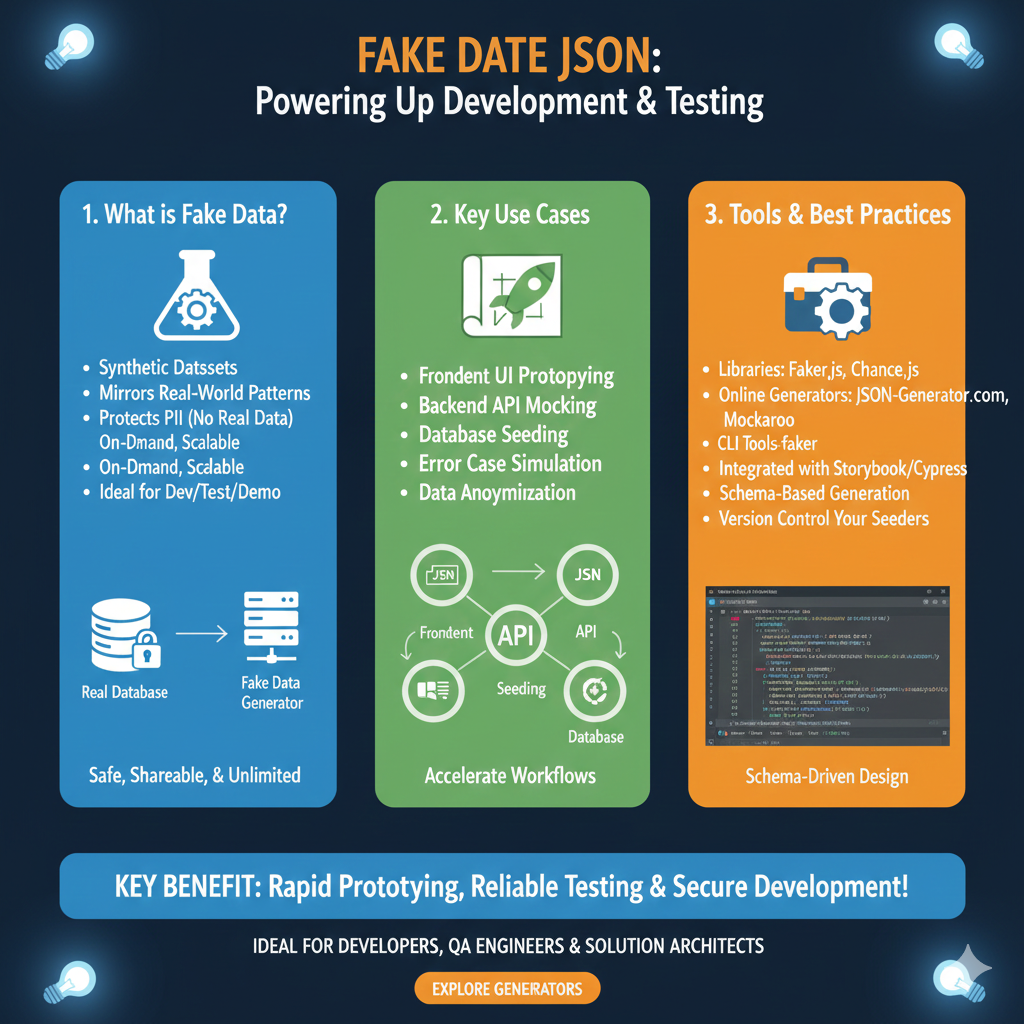
Leveraging Synthetic Datasets for Agile Development
This guide is structured into three distinct areas: the definition of fake data, primary use cases, and recommended tools for schema-driven design:
1. What is Fake Data? (Blue)
This module explains the foundational properties of synthetic datasets:
- Synthetic Attributes: These are Synthetic Datasets that Mirror Real-World Patterns to ensure a realistic development environment.
- Security & Privacy: A primary function is that it Protects PII (No Real Data), making it Safe, Shareable, & Unlimited for team use.
- Scalability: Designed to be On-Demand and Scalable, making it ideal for Dev/Test/Demo environments.
- Visual Logic: Illustrates a workflow where a Fake Data Generator provides data that replaces the need to access a Real Database during early-stage development.
2. Key Use Cases (Green)
This section highlights how fake data is utilized across different development phases:
- Prototyping: Facilitates Frontend UI Prototyping and Backend API Mocking before the final systems are built.
- Database Management: Essential for Database Seeding and Data Anonymization of existing records.
- Resilience Testing: Enables Error Case Simulation to ensure applications handle failures gracefully.
- Workflow Acceleration: Displays an integration map where an API uses seeded data to feed both the Frontend and the Database simultaneously.
3. Tools & Best Practices (Orange)
The final pillar explores the technical ecosystem for generating and managing mock data:
- Libraries & Generators: Recommends popular libraries like Faker.js and Chance.js, as well as online platforms like JSON-Generator.com and Mockaroo.
- Development Integration: Highlights the importance of Integrated with Storybook/Cypress and the use of CLI Tools like faker.
- Standards & Maintenance: Encourages Schema-Based Generation and emphasizes that teams should Version Control Your Seeders to maintain consistency.
- Visual Representation: Shows a Schema-Driven Design interface that generates structured code based on predefined rules.
learn for more knowledge
Mykeywordrank-> Search for SEO: The Ultimate Guide to Keyword Research and SEO Site Checkup – keyword rank checker
json web token->jwt react Authentication: How to Secure Your react app with jwt authentication – json web token
Json Compare ->compare json online free: Master json compare online with the Best json compare tool and online json Resources – online json comparator
Json Parser ->How to Effectively Use a JSON Parser API: A Comprehensive Guide – json parse
Leave a Reply