What is a Fake JSON API and Why You Need It
In the world of web and application development, it’s common for frontend and backend teams to work concurrently. However, the frontend often needs data from an API to build and test features even before the backend API is fully developed. This is where a fake JSON API example becomes an invaluable tool. A fake JSON API, also known as a mock API or dummy API, provides predefined JSON responses to HTTP requests, simulating a real backend API without any actual server-side logic.
Why Use a Fake JSON API?
- Rapid Prototyping: Quickly build and demonstrate frontend features without waiting for backend development.
- Frontend Development Without Backend: Decouple frontend development from backend progress, allowing developers to work independently.
- API Testing: Test how your application handles various API responses, including success, error, and different data structures.
- Learning and Experimentation: Great for learning new frameworks, libraries, or API consumption patterns without setting up a full backend.
Popular Fake JSON API Examples
Several services offer fake JSON APIs that you can use immediately. Here are a few prominent ones:
JSONPlaceholder (typicode)
JSONPlaceholder is a free online REST API that you can use whenever you need some fake data. It’s perfect for testing and prototyping. It provides typical resources like posts, comments, users, and todos.
Example Endpoint:
GET https://jsonplaceholder.typicode.com/posts/1Example Response:
{ "userId": 1, "id": 1, "title": "sunt aut facere repellat provident occaecati excepturi optio reprehenderit", "body": "quia et suscipit\nsuscipit recusandae consequuntur expedita et cum\nreprehenderit molestiae ut ut quas totam\nnostrum rerum est autem sunt rem eveniet architecto"}Reqres.in
Reqres is another popular service for testing frontend applications. It provides a REST API that returns faked user data, and it also supports various HTTP methods like GET, POST, PUT, DELETE, making it versatile for simulating different API interactions.
Example Endpoint:
GET https://reqres.in/api/users?page=2Example Response (partial):
{ "page": 2, "per_page": 6, "total": 12, "total_pages": 2, "data": [ { "id": 7, "email": "michael.lawson@reqres.in", "first_name": "Michael", "last_name": "Lawson", "avatar": "https://reqres.in/img/faces/7-image.jpg" }, // ... more user data ], "support": { "url": "https://reqres.in/#support-heading", "text": "To keep ReqRes free, contributions are greatly appreciated!" }}MockAPI.io
MockAPI.io allows you to create your own custom mock APIs with a user-friendly interface. You can define your resources, data types, and even relationships between data. This is great for scenarios where the generic data from JSONPlaceholder or Reqres doesn’t quite fit your needs.
How to Use a Fake JSON API in Your Projects
Integrating a fake JSON API into your frontend project is straightforward. You treat its endpoints just like you would a real API.
- Identify Your Needs: Determine what data structures and endpoints your frontend requires.
- Choose a Service: Select a fake API service that best fits your complexity and customization needs.
- Integrate with Your Frontend: Use standard JavaScript APIs like
fetchor libraries like Axios to make HTTP requests to the fake API endpoints.
Here’s a simple JavaScript example using the fetch API to retrieve data from JSONPlaceholder:
<script> async function fetchData() { try { const response = await fetch('https://jsonplaceholder.typicode.com/posts/1'); if (!response.ok) { throw new Error(`HTTP error! status: ${response.status}`); } const data = await response.json(); document.getElementById('api-data').textContent = JSON.stringify(data, null, 2); } catch (error) { console.error('Fetch error:', error); document.getElementById('api-data').textContent = 'Failed to load data.'; } } fetchData();</script><pre id="api-data">Loading...</pre>Best Practices
- Understand Limitations: Fake APIs are for mocking; they don’t perform actual database operations or complex business logic.
- Consistency in Data: If manually creating mock data, ensure it’s consistent and representative of what a real API would return.
- Transition to Real API: Have a clear plan for when and how you will switch from the fake API to the real backend API during development.
Conclusion
A fake JSON API example is an essential tool in a modern developer’s toolkit. It empowers frontend teams to accelerate development, improve testing, and foster independent workflows. By leveraging services like JSONPlaceholder, Reqres.in, or MockAPI.io, you can significantly streamline your development process and ensure a smoother transition when the real backend is ready.
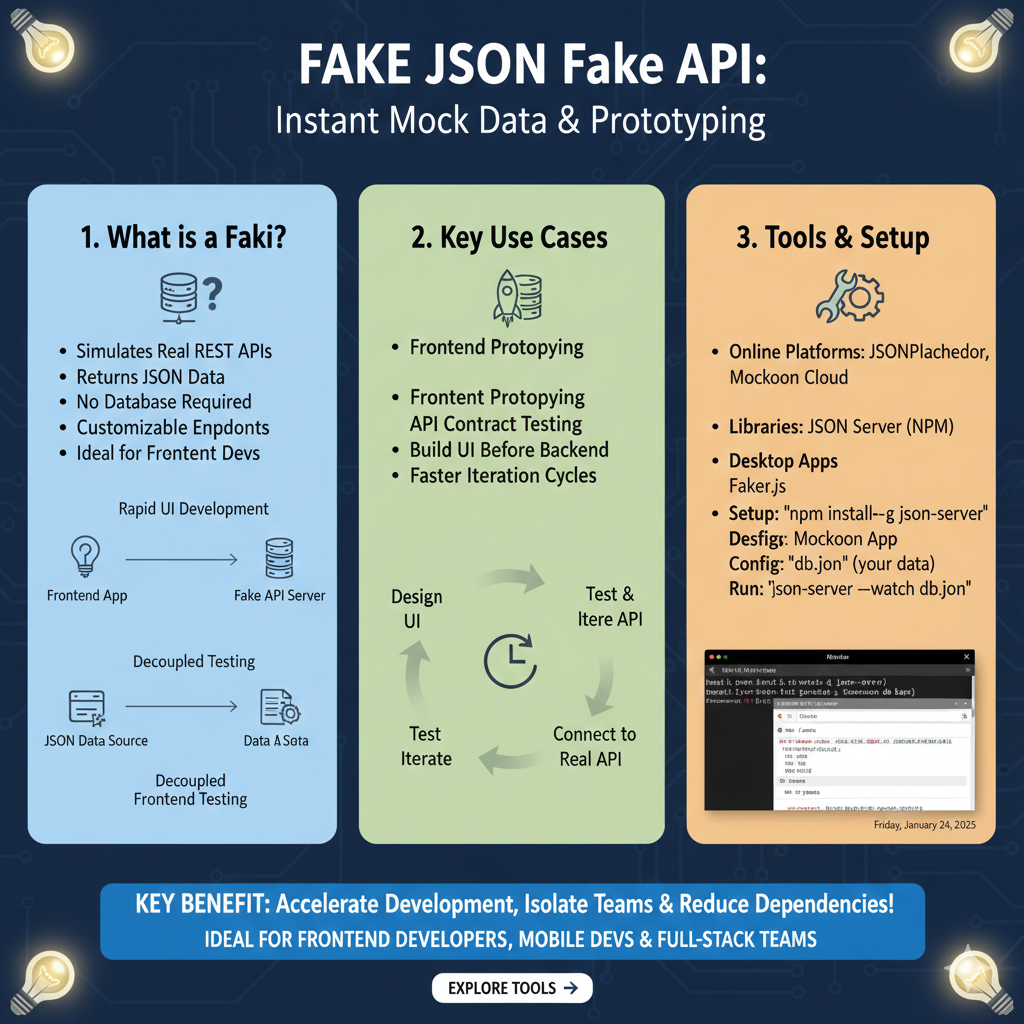
The infographic titled “FAKE JSON Fake API: Instant Mock Data & Prototyping” serves as a comprehensive guide for developers looking to accelerate their application builds using decoupled testing and mock servers.
🛠️ Strategic Mocking for Modern Web Development
The content is organized into three core modules: an introduction to fake APIs, strategic use cases, and a technical setup guide.
1. What is a Faki (Fake API)? (Blue)
This section defines the utility of a simulated backend environment:
- Functional Simulation: It Simulates Real REST APIs and Returns JSON Data without requiring a live database.
- Developer Flexibility: Features Customizable Endpoints, making it an Ideal tool for Frontend Devs.
- Visual Workflows: Illustrates Rapid UI Development where a Frontend App communicates with a Fake API Server, and Decoupled Testing where a JSON Data Source provides data to various Data Sets.
2. Key Use Cases (Green)
This module explores how mock data streamlines the development lifecycle:
- Agile Prototyping: Facilitates Frontend Prototyping and API Contract Testing to ensure compatibility.
- Parallel Development: Allows teams to Build UI Before Backend is ready, resulting in Faster Iteration Cycles.
- Iterative Loop: Displays a circular workflow: Design UI $\rightarrow$ Test & Iterate API $\rightarrow$ Connect to Real API $\rightarrow$ Test & Iterate.
3. Tools & Setup (Orange)
The final pillar provides a toolkit for immediate implementation:
- Platform & Libraries: Recommends online platforms like JSONPlaceholder and Mockoon Cloud, alongside libraries like JSON Server (NPM) and Faker.js.
- Quick Installation: Outlines a simple setup process using the terminal:
- Install:
npm install -g json-server. - Config: Create a “db.json” file containing your data.
- Run: Execute
json-server --watch db.jsonto start the mock server.
- Install:
- Dashboard View: Shows a preview of a mock API management interface with organized data endpoints.
learn for more knowledge
Mykeywordrank-> Search for SEO: The Ultimate Guide to Keyword Research and SEO Site Checkup – keyword rank checker
json web token->jwt react Authentication: How to Secure Your react app with jwt authentication – json web token
Json Compare ->compare json online free: Master json compare online with the Best json compare tool and online json Resources – online json comparator
Json Parser ->How to Effectively Use a JSON Parser API: A Comprehensive Guide – json parse
Leave a Reply