Introduction: Why You Need a Dummy JSON API
In the world of web development, interacting with APIs (Application Programming Interfaces) is a daily task. Frontend developers often need to build user interfaces before the backend API is fully ready, or they need stable data for testing purposes without hitting a live server. This is where a dummy JSON API becomes incredibly valuable. It provides a quick, reliable source of data that mimics a real API, allowing you to develop and test your applications efficiently.
This guide will show you various methods on how to create a dummy JSON API, from local setups to using online services, ensuring you have the right tool for any scenario.
Methods to Create a Dummy JSON API
Method 1: Local Server with Node.js and JSON Server
One of the most popular and flexible ways to create a local dummy API is by using JSON Server. It’s a full fake REST API that takes only a few minutes to set up and runs on Node.js.
Steps to Use JSON Server:
Method 2: Using Online Dummy API Generators and Services
Prerequisite: Ensure you have Node.js installed on your machine. You can download it from the official Node.js website.
Install JSON Server: Open your terminal or command prompt and run the following command to install JSON Server globally:
npm install -g json-serverCreate a
db.jsonfile: In your project directory, create a file nameddb.json. This file will hold all your mock data. Here’s an example:Start the JSON Server: Navigate to your project directory in the terminal and run:
json-server --watch db.jsonYour dummy JSON API will now be running, typically onhttp://localhost:3000. You can access your data at endpoints likehttp://localhost:3000/postsorhttp://localhost:3000/comments/1. JSON Server also supports full CRUD operations, pagination, filtering, and more!
If you prefer not to set up a local server or need a quick public endpoint, several online services provide free dummy JSON APIs:
JSONPlaceholder: This is a classic choice for fake online REST APIs. It provides a wide range of common resources (posts, comments, users, todos, photos) with full CRUD support. It’s read-only, making it perfect for frontend development where you don’t need to persist changes.Example Fetch:
fetch('https://jsonplaceholder.typicode.com/posts/1').then(response => response.json()).then(json => console.log(json));Reqres.in: Offers a hosted REST-API ready to respond to your AJAX requests. It supports all standard HTTP methods and provides responses for user registration and login.FakeStoreAPI: A free fake API for testing and prototyping e-commerce projects. It provides endpoints for products, carts, and users.
MockAPI.io: Allows you to create your own custom mock APIs online. You define your data structure, and it generates a REST API for you, complete with CRUD operations.
These services are excellent for quick prototyping, online code examples, and testing without any local setup.
Method 3: Simple Local File Hosting (for Static Data)
For very basic scenarios where you just need static JSON data and don’t require any server-side logic or complex routing, you can simply host a .json file locally.
Steps for Local File Hosting:
Create a
data.jsonfile: Save your JSON data in a file, for example,data.json, within your project folder:
{ "products": [ { "id": 101, "name": "Wireless Mouse", "price": 25.99 }, { "id": 102, "name": "Mechanical Keyboard", "price": 79.50 } ]}
Serve the file: You’ll still need a minimal web server to serve this file to avoid browser CORS (Cross-Origin Resource Sharing) restrictions when fetching from a local HTML file. A simple way is to use Python’s built-in HTTP server or a lightweight Node.js server:
Python: Open your terminal in the directory containing
data.jsonand runpython -m http.server 8000(Python 3) orpython -m SimpleHTTPServer 8000(Python 2). Your JSON will be available athttp://localhost:8000/data.json.Node.js (using
servepackage): Install globally:npm install -g serve. Then, in your project directory, runserve. Your JSON will be accessible via the provided local URL.
This method is ideal when you need static data that won’t change, and you want full control over the file content.
Conclusion
Creating a dummy JSON API is an essential skill for modern developers, significantly speeding up the development and testing phases of any project. Whether you opt for the powerful local setup with JSON Server, leverage the convenience of online services like JSONPlaceholder, or simply serve a static JSON file, having a reliable source of mock data will streamline your workflow. Choose the method that best fits your project’s needs and start building more efficiently today!
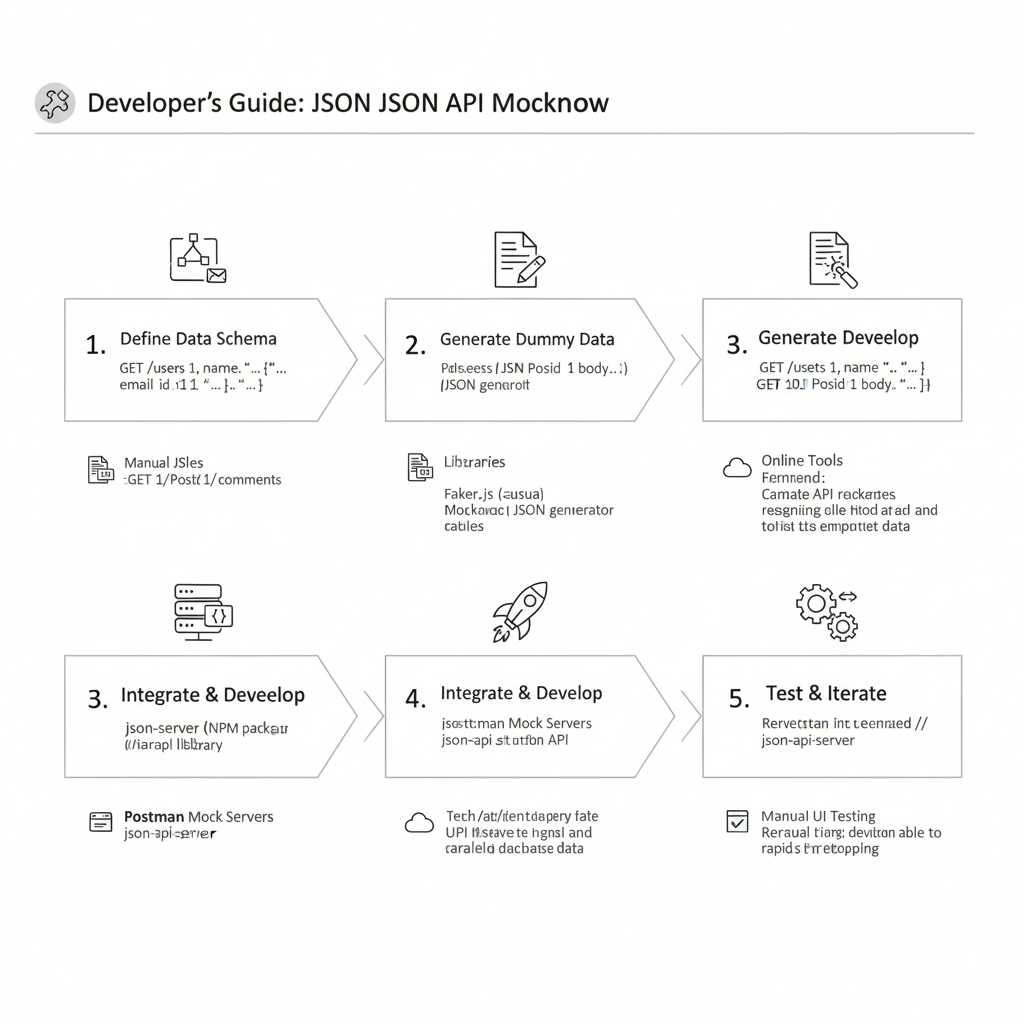
JSON API Mocking Workflow
The process is divided into five key, sequential steps:
1. Define Data Schema
- Action: The developer defines the required structure and endpoints of the API (e.g.,
GET /users/1,POST /comments). - Tools: This can be done using Manual JSON files or by using Postman files to define the desired structure.
2. Generate Dummy Data
- Action: Create the actual content for the JSON files.
- Tools:
- Libraries: Libraries like Faker.js or a JSON generator can be used to generate realistic but fake data.
- Online Tools: Online tools are available to rapidly generate data.
3. Generate Developee / Integrate & Develop
- Action: The generated data is served as a working API. The steps combine the setup of the mock server and the initial integration.
- Tools:
json-server(NPM package/library): Used to launch the JSON files as a REST API.- Postman Mock Servers: Allows the use of Postman’s built-in feature to host the mock API.
4. Integrate & Develop
- Action: The frontend or client application starts making API calls to the mock server’s endpoints.
- Benefit: This enables parallel development, allowing the frontend to progress rapidly without waiting for the real backend API to be complete.
5. Test & Iterate
- Action: The mock API is used for testing and validation.
- Steps:
- Manual UI Testing: The user performs manual testing to ensure the application works with the mock data.
- Iterate: Developers can quickly change the JSON files to test different scenarios (e.g., error states, empty arrays) and repeat the process.
learn for more knowledge
Json Parser ->BeautifulSoup JSON Parser-Combining BeautifulSoup and JSON for Web Scraping – json parse
Json web token ->What Is Okta JWT? (Beginner-Friendly Explanation) – json web token
Json Compare ->Diff JSON Online- The Ultimate Guide to Comparing JSON Files for Developers – online json comparator
Mykeywordrank ->Search for SEO: The Ultimate Guide to Keyword Research and SEO Site Checkup – keyword rank checker
Leave a Reply