Introduction to Dummy API Response Patterns
In the dynamic world of web development, front-end and back-end teams often work in parallel. This frequently leads to scenarios where the front-end needs to consume an api that isn’t fully developed or is undergoing changes. This is precisely where a dummy api response becomes an indispensable tool.
A dummy api response is a simulated or mocked api that accurately mimics the structure, data types, and typical behavior of a real json api endpoint. Using a sample api allows developers to proceed with their work without delays, ensuring continuous progress and significantly accelerating the development lifecycle.
Why Every Team Needs a Dummy API Response Strategy
Integrating response mocking into your workflow offers several compelling advantages:
- Parallel Development: Front-end teams can commence building users interfaces and integrating data flows even before the actual backend apis are fully functional.
- Faster Iteration and Prototyping: Quickly test different response scenarios and UI behaviors without the need for complex backend setups or a live mock server.
- Isolated and Reliable Testing: Create predictable fake json for unit, integration, and end-to-end tests, making your test suites independent of external service availability.
- Error Simulation: Effortlessly test how your api handles various HTTP status codes and custom error messages using api mocks.
- Demonstrations: Showcase application functionality to stakeholders using a dummy api without requiring a fully operational backend.
Methods to Create a Sample API with JSON API Standards
1. Using Local JSON Files and Dummy-JSON Mock
The simplest approach is to create static fake json files. These can then be served locally to act as a test api.
Tip: You can use a dummy-json mock library to generate massive amounts of sample data for your users list or product catalog.
To serve these locally, you can use:
- Simple HTTP Server (Python): Serve your dummy api directory on port 8000.
- json-server (Node.js): Turns a json file into a full mocked api with routing.
2. Online Response Mocking and Fake JSON Services
Several platforms provide free services to mock and host a dummy api response. These are excellent for sharing with a team or when you need a public mock server.
- Reqres: A widely used dummy api that provides a real json api for testing your AJAX requests with fake data for users.
- Beeceptor: If you need to mock beeceptor style, this tool provides api mocks, request inspection, and proxying capabilities.
- DummyJSON: A great resource for dummy apis providing json data for e-commerce, products, and more.
- Postman Mock Servers: Use postman to define a request and generate a response directly from your collections.
3. Backend Mocked API Frameworks
For more sophisticated scenarios, using a library for response mocking within your test environment is ideal.
- Mock Service Worker (MSW): Intercepts a request at the network level, providing a valid sample without changing application code.
- Beeceptor and Postman: These remain the gold standard for cloud-based mock servers that your whole team can access.
Best Practices for Dummy API Management
- Mirror Real Data: Ensure your dummy api response resembles the production api structure.
- Cover Edge Cases: Use fake data to simulate empty states, paginated results, and complex nested objects.
- Simulate All Status Codes: Don’t just test 200 OK. Use your mock server to simulate 404 and 500 errors.
- Keep API Mocks Updated: As your real apis evolve, update your dummy api response files to reflect the latest changes.
Conclusion
Mastering the creation of a dummy api response is a crucial skill. By leveraging sample api tools like reqres, beeceptor, and postman, you can enhance your development speed and improve test reliability. Embrace dummy apis and fake json today to streamline your workflow and build more robust applications.
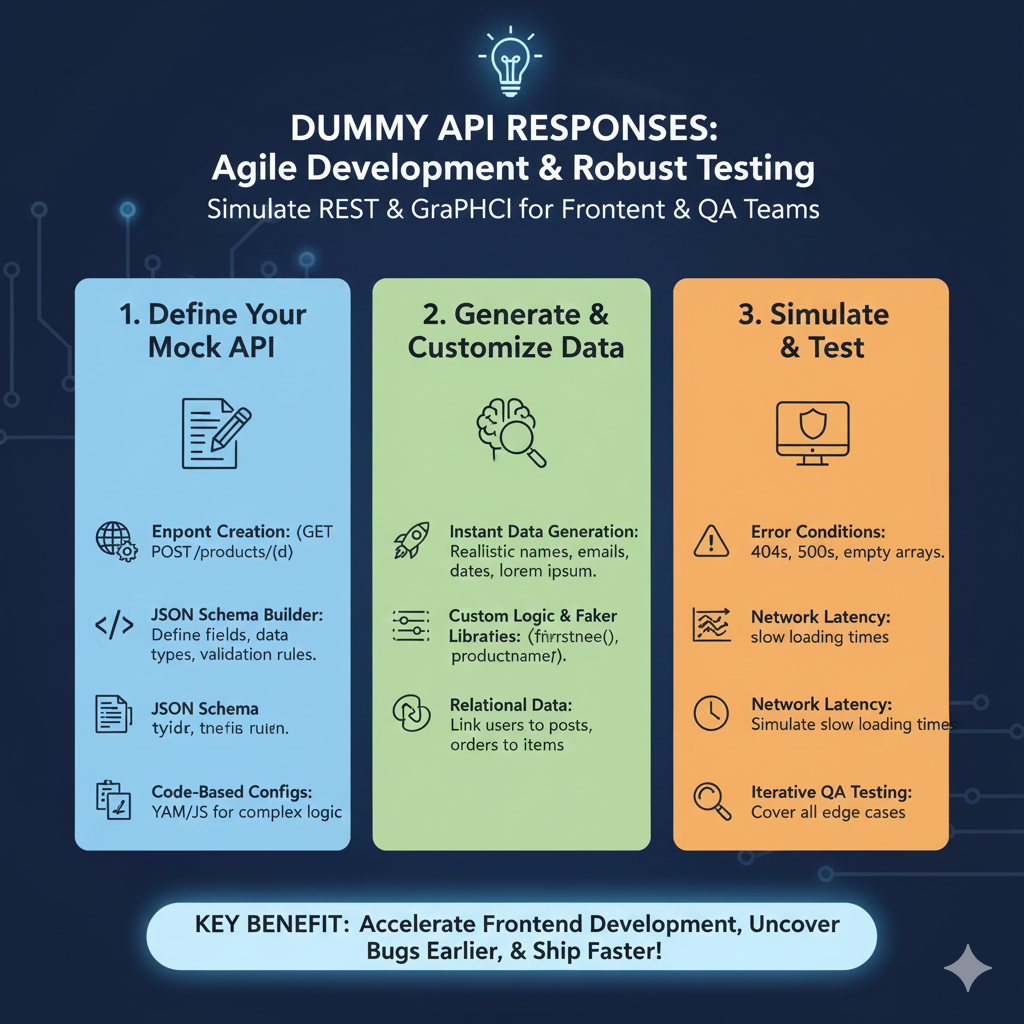
The infographic titled “DUMMY API RESPONSES: Agile Development & Robust Testing” explains how simulating REST and GraphQL APIs supports frontend and QA teams.
🛠️ Dummy API Response Workflow
The process is organized into three distinct stages to enhance development speed and software reliability:
1. Define Your Mock API (Blue)
This stage focuses on setting up the structure of the fake service:
- Endpoint Creation: Users can create standard REST endpoints such as GET and POST for specific routes like
/products/(d). - JSON Schema Builder: This tool allows developers to define specific fields, data types, and validation rules for the responses.
- JSON Schema Preview: Provides a view of the schema structure being built.
- Code-Based Configs: Supports using YAML or JavaScript (JS) for defining more complex backend logic within the mock.
2. Generate & Customize Data (Green)
This section details how to populate the mock API with usable information:
- Instant Data Generation: The system can automatically produce realistic data points like names, emails, dates, and “lorem ipsum” text.
- Custom Logic & Faker Libraries: Developers can use specialized functions (e.g.,
firstname(),productname()) to generate specific types of fake data. - Relational Data: The tool can link different data types together, such as connecting users to posts or orders to specific items.
3. Simulate & Test (Orange)
The final stage is dedicated to rigorous testing and performance simulation:
- Error Conditions: Facilitates testing how the application handles failure states like 404 Not Found, 500 Internal Server Errors, or empty arrays.
- Network Latency: Users can intentionally simulate slow loading times to test the application’s responsiveness under poor network conditions.
- Iterative QA Testing: This workflow is designed to help teams cover all possible edge cases before the real backend is ready.
learn for more knowledge
Json parser-> How to Parse JSON in Go (Golang JSON Parser Tutorial) – json parse
Json web token ->How to Securely Implement and Validate JWTs in AWS – json web token
Json Compare ->How to Compare Two JSONs Online: Your Ultimate Guide – online json comparator
Mykeywordrank-> Keyword SEO-Master Keyword Research and Discover the Best SEO Keywords with a Free Keyword Tool – keyword rank checker
Leave a Reply