How to Easily Create a Mock JSON API Online for Development & Testing
Are you a developer often waiting for backend APIs to be ready before you can start front-end development or testing? Or do you need a temporary API endpoint for a quick demo or prototype? The solution you’re looking for is a mock JSON API online.
What is a Mock JSON API?
A mock JSON API is a simulated web service that mimics the behavior of a real API. It provides predefined responses to specific requests, allowing front-end developers, testers, and designers to work independently without relying on a fully functional backend.
Why Use an Online Mock JSON API?
- Parallel Development: Front-end and back-end teams can work concurrently.
- Faster Prototyping: Quickly build and demonstrate features without a live backend.
- Isolated Testing: Create consistent test environments, free from backend bugs or changes.
- Reduced Dependency: Minimize roadblocks caused by backend delays.
- Cost-Effective: Often free or low-cost for basic usage compared to deploying a full backend.
How to Create a Mock JSON API Online
Several online tools make creating and hosting a mock JSON API incredibly simple. Here’s a general guide:
1. Choose an Online Mocking Tool
Popular choices include:
- JSONPlaceholder: A free fake API for testing and prototyping. It offers a pre-defined set of resources (posts, comments, users, etc.).
- MockAPI.io: Allows you to create custom REST APIs with a simple interface, often with faker data generation.
- Mocky.io: Generates custom HTTP responses with specified status codes, headers, and body content for one-off mocks.
- Beeceptor: Offers advanced mocking capabilities, inspection, and proxying.
2. Define Your Data Structure (JSON)
Before using a tool, decide what data your API will return. This will be in JSON format. For example, for a list of products:
[
  {
    "id": 1,
    "name": "Laptop Pro",
    "price": 1200,
    "category": "Electronics"
  },
  {
    "id": 2,
    "name": "Mechanical Keyboard",
    "price": 150,
    "category": "Peripherals"
  }
]
3. Use the Tool to Create Endpoints
Each tool has its own interface, but the general steps are:
- Navigate to the tool’s website (e.g., MockAPI.io or Mocky.io).
- Sign up or log in (if required for persistent mocks).
- Create a new “project” or “resource” (for tools like MockAPI.io).
- Define your API endpoint path (e.g.,
/products). - Paste your JSON data into the response body field.
- Set the HTTP method (GET, POST, PUT, DELETE) and status code (e.g., 200 OK).
- Save and get your unique API endpoint URL.
Example with Mocky.io
With Mocky.io, you can quickly define a static response:
- Go to mocky.io.
- Paste your desired JSON response into the “Response Body” editor.
- Set the “HTTP Status” (e.g., 200).
- Click “Generate my HTTP response”.
- You’ll get a unique URL like
http://www.mocky.io/v2/YOUR_UNIQUE_ID.
This URL will always return the JSON you defined, making it perfect for quick tests or demonstrations.
Example with MockAPI.io (Conceptual)
For more complex scenarios with multiple resources and full CRUD operations, tools like MockAPI.io or JSONPlaceholder are better. Let’s say you want an endpoint for users. You’d go to MockAPI.io, create a new resource named “users”, and define its schema. MockAPI.io then automatically generates RESTful endpoints like:
GET /users– Get all usersGET /users/{id}– Get a single userPOST /users– Create a new user
You can then populate it with data, or let the tool generate faker data for you.
Integrating Your Mock API
Once you have your mock API URL, you can integrate it into your front-end application just like a real API. Here’s a JavaScript fetch example:
fetch('YOUR_MOCK_API_URL/products')
  .then(response => response.json())
  .then(data => console.log(data))
  .catch(error => console.error('Error:', error));
Simply replace 'YOUR_MOCK_API_URL/products' with the URL provided by your chosen online mocking service.
Conclusion
Leveraging a mock JSON API online is a powerful strategy for any development team looking to accelerate their workflow, reduce dependencies, and improve the robustness of their testing. By understanding how to create and use these tools, you can significantly streamline your development process and bring products to market faster.
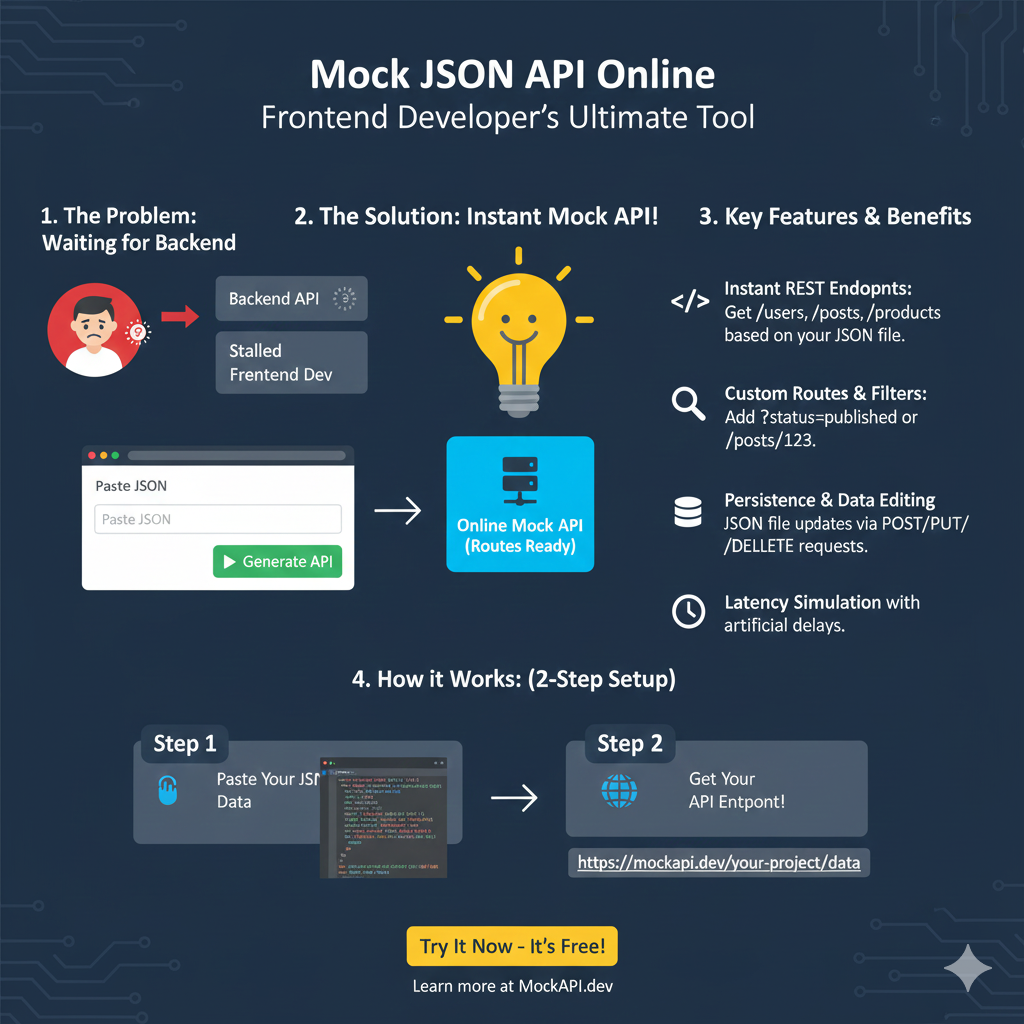
Mock JSON API Online
This infographic explains how an online mock API service helps frontend developers overcome dependencies on a slow or stalled backend.
1. The Problem & The Solution 💡
| Section | Description |
| The Problem: | Stalled Frontend Dev. Developers are waiting for Backend API endpoints to be ready, leading to delays. |
| The Solution: Instant Mock API! | By using the tool, developers can create an Online Mock API (Routes Ready) immediately after pasting their desired JSON data. |
2. Key Features & Benefits ✨
The service offers features that mimic a real backend API, allowing for comprehensive frontend testing.
- Instant REST Endpoints: Automatically generates endpoints like
/usersor/postsbased on the JSON structure provided. - Custom Routes & Filters: Supports queries like
?status=publishedor specific resource access like/posts/123. - Persistence & Data Editing: Allows the JSON file to be updated via standard POST, PUT, or DELETE requests.
- Latency Simulation: Includes the ability to add artificial delays to simulate network latency.
3. How it Works: (2-Step Setup) ⚙️
The setup is designed to be quick and straightforward, allowing developers to get started immediately.
- Step 1: Paste Your JSON Data. The user inputs their desired data structure into a text area.
- Step 2: Get Your API Endpoint!. The tool instantly generates a live, persistent URL, such as
https://mockapi.dev/your-project/data.
learn for more knowledge
Json Parser ->What Is jQuery JSON Parser, jQuery. Parse.Json, JSON.parse, jQuery.getJSON, ParseJSON Explanation) – json parse
Json web token ->What is protegrity tokenization, data protection, tokenization, vaultless tokenization – json web token
Json Compare ->What is Compare JSON Objects Online: Beginner-Friendly Guide – online json comparator
MyKeywordrank ->SEO Optimization Checker: Mastering Website SEO Optimization and Rankings – keyword rank checker
Leave a Reply