Why a Dummy JSON Data API is Vital for API Testing
In the world of web development, waiting for a functional backend can stall progress. Utilizing a dummy api provides consistent test data so that your posts, users, and products components can be built in isolation. By using fake json, you can simulate high-volume data scenarios that a live database might not yet have.
When you generate test data through a json api, you ensure that your application handles every res (response) correctly. This is essential for api testing where you need to verify how your UI reacts to different data structures, from a simple user profile to complex e-commerce products.
Leading Fake API Services for Test Data
1. JSONPlaceholder: The Classic Dummy API
JSONPlaceholder is the go-to dummy json data api for many. It is perfect when you need to search for or post basic resources like posts and users.
- Endpoints:
/posts,/comments,/users, and more. - Action: You can easily create a new post to test your forms.
2. Reqres.in: Real Responses for Users
Reqres provides a hosted fake api ready to respond to your AJAX requests. It’s particularly good for testing user authentication and management.
- Focus: It simulates real-world res codes like 200 (Success) or 404 (Not Found).
3. DummyJSON: Advanced Data and Search
For more complex needs, dummyjson offers a wider array of apis. It allows you to search through a product catalog or retrieve detailed address information for a user.
- Resources: Includes products, carts, and even a fake login api.
Mockaroo: How to Generate a Create API with Custom Data
If standard placeholders aren’t enough, mockaroo is a powerful tool to generate large amounts of realistic fake json. You can define your own schema, including specific fields like address or custom product IDs, and even create api endpoints that return your custom data.
With mockaroo, you don’t just get a post; you get a tailored json structure. You can generate up to 1,000 rows of test data for free, making it an indispensable part of a robust api testing strategy.
Streamlining Your Development with a Dummy API
Integrating these apis into your workflow offers several key benefits:
- Faster Iteration: Quickly create and test new UI features.
- Independent Workflows: Frontend teams can work without the backend being ready.
- Search and Filter Testing: Use dummyjson to test complex search logic across a product list.
- Realistic Edge Cases: Generate data with mockaroo to see how your json api handles null values or long strings.
Conclusion
Mastering the dummy json data api is an essential skill. By leveraging a fake api for api testing, you can build more robust applications faster. Whether you are using dummyjson for products or mockaroo to generate a custom create api, these tools ensure your data is always ready when you are.
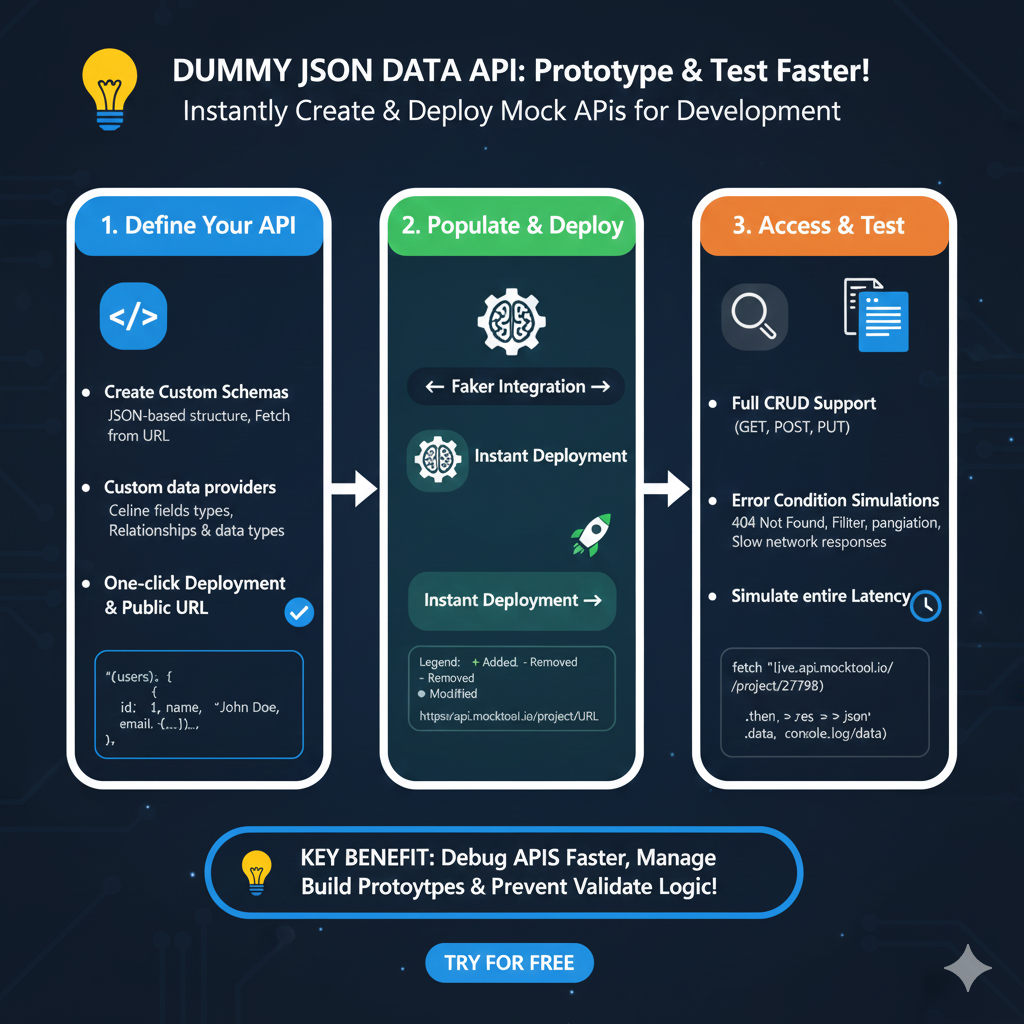
Mock API Development Workflow
The process is structured into three essential stages to help teams validate application logic and UI components early in the development cycle:
1. Define Your API (Blue)
This initial phase sets the foundation for your data structure:
- Custom Schemas: Design JSON-based structures that can be fetched via URL to match your specific application requirements.
- Custom Data Providers: Define specific field types and complex relationships between data points.
- Instant Availability: Use one-click deployment to generate a public URL immediately.
2. Populate & Deploy (Green)
This stage focuses on filling your API with realistic, dynamic content:
- Faker Integration: Automatically generate lifelike data such as names, emails, and addresses to ensure your UI looks realistic.
- Live Deployment: Finalize your mock server with “Instant Deployment,” making the endpoints ready for live requests.
- Visual Legend: The tool identifies changes in your data structure using color codes: Green (+) for added elements, Yellow (-) for removed, and White (●) for modified fields.
3. Access & Test (Orange)
The final stage involves integrating and stress-testing your application:
- Full CRUD Support: Interact with your mock data using standard GET, POST, and PUT methods.
- Edge Case Simulation: Test your app’s resilience by simulating 404 Not Found errors, pagination, and slow network responses.
- Latency Control: Use “Simulate entire Latency” to see how your frontend handles delays in data delivery.
learn for more knowledge
Mykeywordrank-> small seo tool for keyword rank checking and local rank checker – keyword rank checker
json web token-> python jwt: How to Securely Implement jwt in python – json web token
Json Compare ->How to Effectively Use a JSON Comparator Online: Your Ultimate Guide to JSON Compare, and JSON Diff – online json comparator
Json Parser->Jackson JSON Parser: A Comprehensive Guide to Parse JSON for Java Developers – json parse
Leave a Reply