In the fast-paced world of web and mobile application development, efficient testing and rapid prototyping are paramount. Often, developers find themselves waiting for a backend API to be ready, which can significantly slow down progress. This is where fake JSON APIs come into play, offering a powerful solution to maintain momentum.
What is a Fake JSON API?
A fake JSON API, also known as a mock API or simulated API, is an endpoint that mimics the behavior of a real API but serves static or dynamically generated JSON data. It allows front-end developers to continue building and testing their applications without needing a fully functional backend server.
Why Use Fake JSON APIs in Your Development Workflow?
Leveraging fake JSON APIs offers several compelling advantages:
- Accelerated Development: Front-end and back-end teams can work in parallel. Front-end development can start immediately, even if the backend isn’t ready.
- Independent Testing: Isolate front-end components and test them thoroughly without external dependencies, making your unit and integration tests more reliable.
- Reduced Costs: Avoid incurring costs associated with real API calls during extensive testing, especially for third-party APIs with usage limits.
- Consistent Data: Control the exact data returned by the API, making it easier to test edge cases, error states, and specific scenarios.
- Offline Development: Develop and test your application even without an internet connection if you’re using a local fake API server.
How to Effectively Use Fake JSON APIs
There are several approaches to integrating fake JSON APIs into your development process:
- Online Services: These platforms provide ready-to-use endpoints that serve fake data. They are quick to set up and ideal for prototyping.
- Local Servers/Tools: For more control and complex scenarios, you can set up a local server using tools that generate and serve JSON data from files or configurations.
- In-App Mocks: Sometimes, especially for unit testing, you might mock the API calls directly within your application code using libraries like Mock Service Worker (MSW) or Nock.
Popular Tools for Creating Fake JSON APIs
Here are some widely used tools and services:
- JSONPlaceholder: A free online REST API that serves fake data for testing and prototyping. It’s incredibly simple to use and provides common resources like posts, comments, users, etc.
fetch('https://jsonplaceholder.typicode.com/posts/1')
  .then(response => response.json())
.then(json => console.log(json)) - Mockoon: A desktop application (and CLI) that allows you to quickly create and run mock APIs locally. It offers advanced features like custom routes, dynamic responses, and even proxying.
- json-server: A popular Node.js library that lets you create a full fake REST API with zero coding in less than a minute. You just need a JSON file.
// db.json
{
  "posts": [
    { "id": 1, "title": "json-server", "author": "typicode" }
  ]
}

// Command line
json-server --watch db.json - Mirage JS: A client-side API mocking library for JavaScript applications. It lets you build a full-featured mock server that lives in your client-side code.
Best Practices for Using Fake JSON APIs
- Keep Data Realistic: While the data is fake, ensure it closely resembles the structure and types of data your real API will provide. This prevents unexpected issues when switching to the actual API.
- Mimic Real API Behavior: Don’t just return data; simulate status codes (200, 404, 500), error messages, and even slight delays to get a more accurate testing environment.
- Document Your Mocks: Clearly document the endpoints, expected request formats, and response structures of your fake APIs, especially when working in teams.
- Version Control Your Fake Data: If using local JSON files or configurations, keep them under version control (e.g., Git) alongside your project code.
- Integrate with Build Processes: Automate the setup and teardown of your mock servers within your development and testing scripts.
Conclusion
Fake JSON APIs are an indispensable tool in the modern developer’s toolkit. They empower teams to build faster, test more thoroughly, and maintain a smooth workflow regardless of backend readiness. By understanding how to effectively use fake JSON APIs and leveraging the right tools, you can significantly enhance your development efficiency and product quality. Start integrating them into your projects today and experience the benefits firsthand!
DummyJSON API
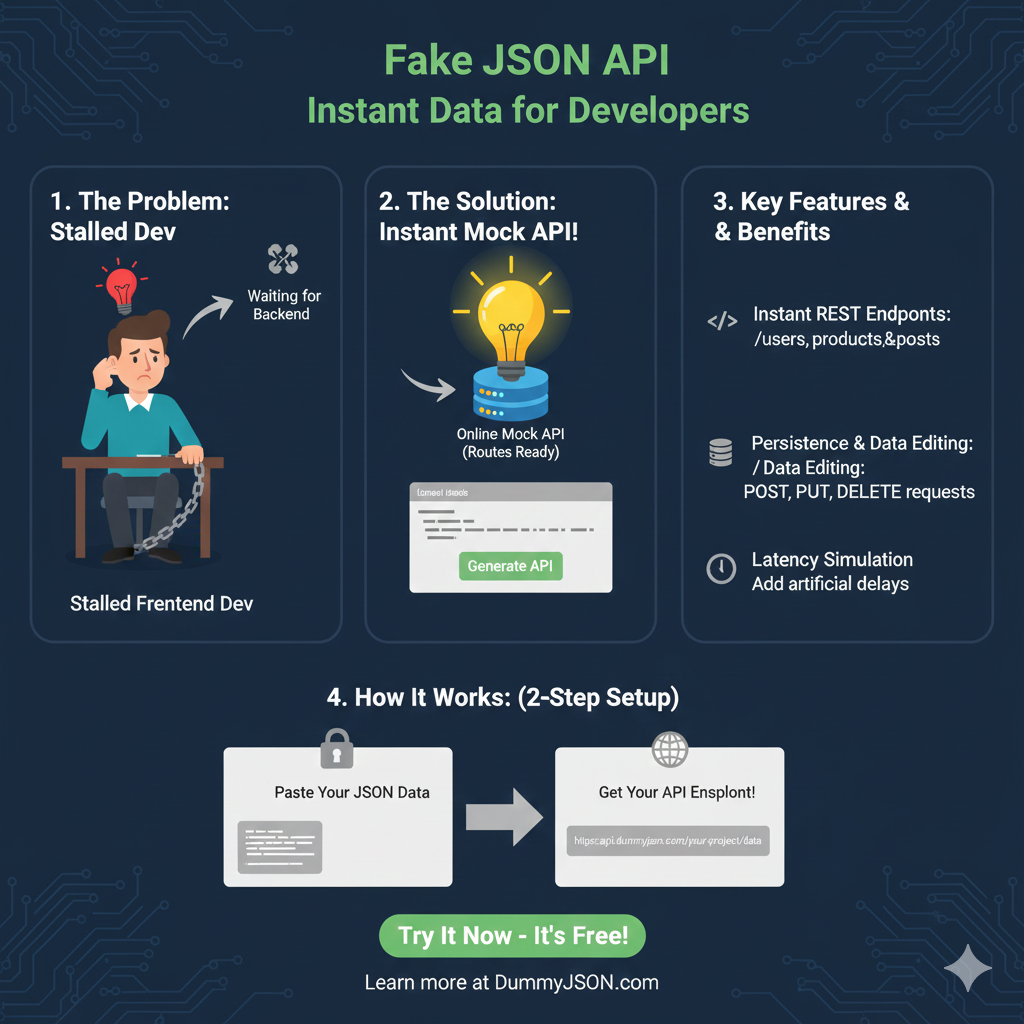
This infographic explains how the DummyJSON API service helps developers create and use mock JSON data immediately for rapid development and testing.
1. The Problem & The Solution 💡
| Section | Description |
| 1. The Problem: | Stalled Dev. The developer is Waiting for Backend API endpoints to be completed, causing development delays. |
| 2. The Solution: | Instant Mock API!. Developers can Paste Your JSON or Select a Resource to immediately get Routes Ready. |
2. Key Features & Benefits ✨
The service offers powerful features that mimic a fully functional backend API, crucial for comprehensive frontend testing.
- Instant REST Endpoints: The API automatically generates standard endpoints like
/users,/products, and/postsbased on the data structure. - Custom Routes & Filters: It supports query parameters for advanced filtering and pagination, such as
/products?limit=5&skip=10. - Persistence & Data Editing: The mock data can be updated dynamically via standard REST methods like POST, PUT, and DELETE requests.
- Latency Simulation: The tool allows developers to add artificial delays to simulate realistic network latency.
3. How It Works: (2-Step Setup) ⚙️
The process is designed for speed and simplicity, allowing developers to get a live API endpoint in minutes.
- Step 1: Paste Your JSON Data. The user provides the desired data structure.
- Step 2: Get Your API Endpoint!. The tool instantly generates a live, persistent URL, such as
https://api.dummyjson.com/your-project/data.
learn for more knowledge
Json Parser ->WHAT IS API JSON Parser – JSON Parser API – JSON.parse – json parse
Json web token ->WHAT IS JWT Security, Web Security,-JSON Web Tokens – json web token
Json Compare ->JSONCompare: The Ultimate JSON Compare Tool – online json comparator
Mykeywordrank ->SEO Ranking Checker -Keyword Rank Checker – keyword rank checker
Leave a Reply