Introduction to Dummy JSON Data
In the world of web development and API testing, having realistic yet non-production data is crucial. This is where dummy JSON data comes into play. It allows developers to build and test applications without needing a fully functional backend or risking real user data.
This guide will show you how to create dummy JSON data effectively, covering various methods and tools to streamline your development process and improve your SEO efforts by providing high-quality, searchable content.
Why Use Dummy JSON Data?
Before diving into the ‘how-to’, let’s quickly understand the benefits:
- Rapid Prototyping: Develop frontend UIs even before the backend API is ready.
- Testing: Create diverse test cases for edge scenarios, error handling, and performance.
- Demonstrations: Showcase application features without exposing sensitive information.
- Consistency: Ensure data structure consistency across different development stages.
Methods to Generate Dummy JSON Data
1. Manual Creation
For small datasets, you can simply write the JSON manually. This is straightforward but becomes cumbersome for larger or more complex structures.
{
  "users": [
    {
      "id": 1,
      "name": "Alice Smith",
      "email": "alice.smith@example.com"
    },
    {
      "id": 2,
      "name": "Bob Johnson",
      "email": "bob.j@example.com"
    }
  ]
}
2. Using Online Dummy JSON Data Generators
Many online tools simplify the creation of structured dummy data:
- JSON Generator: Allows you to define a schema and generates large datasets.
- Mockaroo: Offers a user-friendly interface to create mock data in various formats, including JSON.
- JSONPlaceholder: A free online REST API that serves fake data (posts, comments, users, etc.) for testing and prototyping.
3. Programmatic Generation (JavaScript Example)
For more control and dynamic data, you can write scripts to generate JSON. Here’s a simple JavaScript example:
const generateDummyUsers = (count) => {
  const users = [];
  for (let i = 1; i <= count; i++) {
    users.push({
      id: i,
      name: `User Name ${i}`,
      email: `user${i}@example.com`,
      isActive: Math.random() > 0.5
    });
  }
  return { users: users };
};

console.log(JSON.stringify(generateDummyUsers(3), null, 2));

/* Output:
{
  "users": [
    {
      "id": 1,
      "name": "User Name 1",
      "email": "user1@example.com",
      "isActive": true
    },
    {
      "id": 2,
      "name": "User Name 2",
      "email": "user2@example.com",
      "isActive": false
    },
    {
      "id": 3,
      "name": "User Name 3",
      "email": "user3@example.com",
      "isActive": true
    }
  ]
}
*/
4. Using Libraries and Frameworks
Various programming languages have libraries dedicated to generating fake data:
- Faker.js (JavaScript/Node.js): A popular library for generating realistic fake data for names, addresses, emails, dates, etc.
- Faker (Python): A Python port of Faker.js, offering similar functionalities.
- Lorem Ipsum generators: While not strictly JSON, these can generate textual content for your JSON fields.
Example with Faker.js
First, install it: npm install @faker-js/faker
const { faker } = require('@faker-js/faker');

const createRandomUser = () => {
  return {
    userId: faker.string.uuid(),
    username: faker.internet.userName(),
    email: faker.internet.email(),
    avatar: faker.image.avatar(),
    birthdate: faker.date.birthdate(),
    registeredAt: faker.date.past(),
  };
};

const USERS = faker.helpers.multiple(createRandomUser, { count: 5 });

console.log(JSON.stringify({ users: USERS }, null, 2));
Conclusion
Mastering how to generate dummy JSON data is an essential skill for modern developers. Whether you opt for manual creation, online generators, programmatic scripts, or dedicated libraries, the ability to quickly provision test data will significantly enhance your development workflow, testing accuracy, and overall productivity.
Start integrating these techniques into your projects today to build more robust and reliable applications.
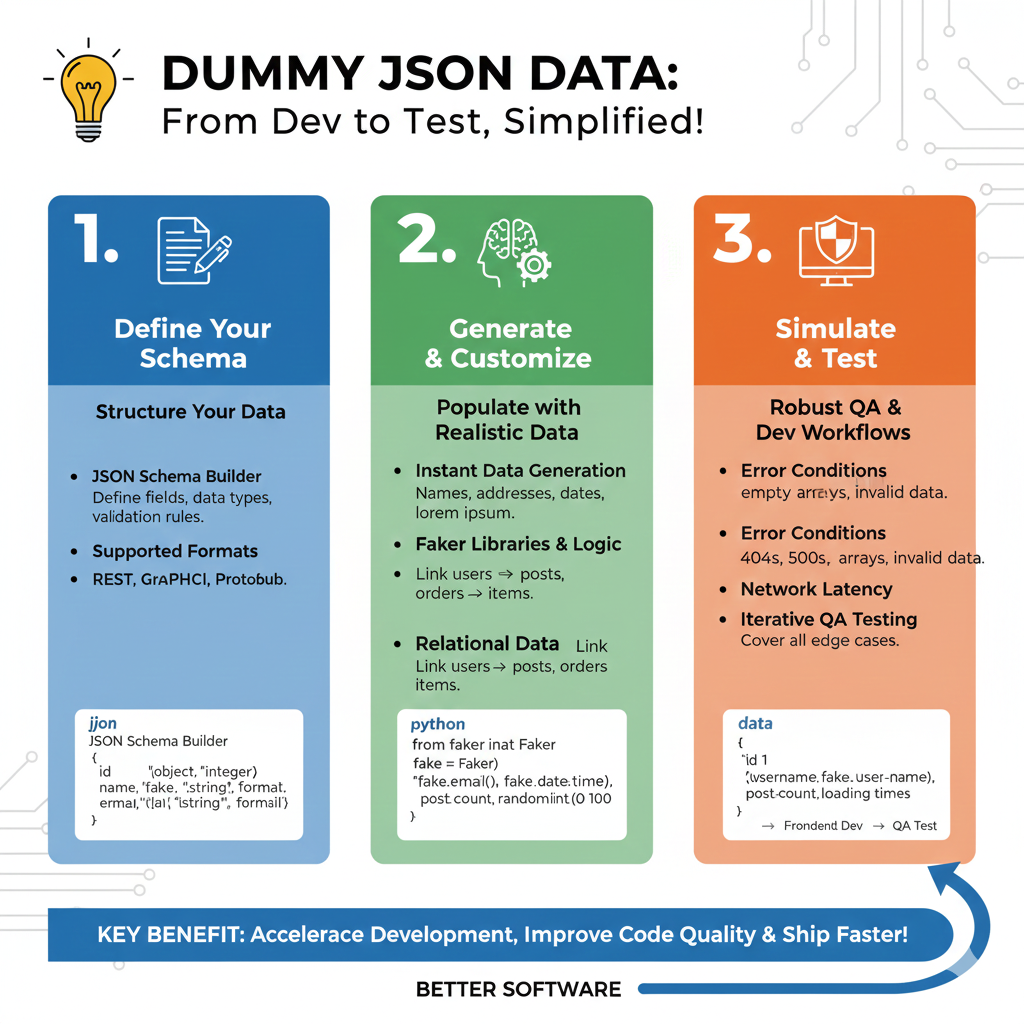
Dummy JSON Data Workflow
The process is divided into three actionable stages designed to improve code quality and speed up delivery cycles:
1. Define Your Schema (Blue)
This initial phase establishes the structural blueprint of your data:
- Structure Your Data: Use a JSON Schema Builder to define specific fields, data types (e.g., string, integer), and validation rules.
- Broad Format Support: The workflow supports various standards including REST, GraphQL, and Protobuf.
2. Generate & Customize (Green)
This section focuses on populating that schema with usable, realistic information:
- Instant Generation: Automatically produce realistic names, addresses, dates, and placeholder “lorem ipsum” text.
- Faker Libraries & Logic: Utilize Python-based tools like the Faker library to generate specific data points such as
fake.email()andrandom.randint(). - Relational Mapping: Establish complex connections between data types, such as linking users to their specific posts or orders to individual items.
3. Simulate & Test (Orange)
The final pillar ensures the application is prepared for real-world scenarios through robust QA:
- Condition Simulation: Test how the frontend handles Error Conditions like empty arrays, invalid data formats, or server errors (404s and 500s).
- Performance Stress-Testing: Simulate Network Latency and slow loading times to ensure a smooth user experience under suboptimal conditions.
- Edge Case Coverage: Engage in Iterative QA Testing to identify and fix bugs before they reach production.
learn for more knowledge
Json Parser-> How to Parse JSON in Go (golang json parser Tutorial) – json parse
Json web token ->How to Securely Implement and Validate aws jwt and jwt – json web token
Json Compare ->How to Easily Compare Two JSON Online: A Comprehensive Guide – online json comparator
Fake Json –>What Is Dummy API JSON? (Beginner-Friendly Explanation) – fake api
Leave a Reply