Developing and testing REST APIs often requires a substantial amount of data. However, waiting for a fully populated backend or manually creating datasets can be time-consuming and inefficient. This is where dummy data for REST API development becomes invaluable. In this guide, we’ll explore various methods and tools to generate and manage dummy data, helping you streamline your workflow and improve your testing processes.
Why Dummy Data is Essential for REST API Development?
Dummy data, also known as mock data or fake data, serves several critical purposes throughout the API development lifecycle:
- Accelerated Frontend Development: Frontend teams can start building UIs and integrating with API structures even before the backend is fully functional.
- Comprehensive Testing: Allows developers to test various scenarios, including edge cases, different data types, and error responses, without impacting live data.
- Early Bug Detection: Helps identify and fix issues related to data handling, parsing, and display much earlier in the development process.
- Performance and Load Testing: Generate large volumes of data to simulate real-world traffic and assess API performance under stress.
- Isolation: Prevents test data from contaminating or interfering with production databases.
How to Get Dummy Data for Your REST API?
There are multiple effective ways to acquire or generate dummy data, depending on your project needs and setup:
1. Manual Creation (For Small-Scale Testing)
For very simple tests or when dealing with a minimal number of data points, you can manually craft JSON objects. This method offers complete control but quickly becomes impractical for larger datasets.
{
  "id": 1,
  "name": "Example Product",
  "description": "A simple product description.",
  "price": 19.99,
  "available": true
}
2. Utilizing Online Dummy Data Generators and Mock APIs
Online services provide ready-to-use REST API endpoints or tools to generate custom datasets. These are excellent for quick prototyping and testing:
- JSONPlaceholder: A free fake online REST API for testing and prototyping. It provides common resources like posts, comments, albums, photos, and users, accessible via standard HTTP methods.
- MockAPI.io: Allows you to create your own custom mock APIs with custom data structures quickly.
- FakerAPI: Generates a wide range of realistic-looking dummy data (names, addresses, emails, etc.) based on predefined schemas.
- Reqres.in: A hosted REST-API ready to respond to your AJAX requests with a small set of predefined users and resources.
Example of fetching data from JSONPlaceholder:
GET https://jsonplaceholder.typicode.com/posts/1
Expected response:
{
  "userId": 1,
  "id": 1,
  "title": "sunt aut facere repellat provident occaecati excepturi optio reprehenderit",
  "body": "quia et suscipit\nsuscipit recusandae consequuntur expedita et cum\nreprehenderit molestiae ut ut quas totam\nnostrum rerum est autem sunt rem eveniet architecto"
}
3. Using Libraries and Fakers in Your Code
For more dynamic and controlled dummy data generation, especially within your test suites or backend applications, programming libraries are ideal:
- Faker (Python): A popular Python package that generates fake data for you.
- Faker.js (JavaScript/Node.js): A robust library to generate massive amounts of fake data in the browser and Node.js.
- Similar libraries exist for almost every major programming language (e.g., Bogus for .NET, GoFakeIt for Go, etc.).
Python example with the Faker library:
from faker import Faker

fake = Faker()

def generate_fake_user():
    return {
        "id": fake.uuid4(),
        "name": fake.name(),
        "email": fake.email(),
        "address": fake.address(),
        "company": fake.company(),
        "job_title": fake.job(),
        "created_at": fake.date_time_this_month().isoformat()
    }

# Generate a single user
print(generate_fake_user())

# Generate a list of 5 users
# for _ in range(5):
#     print(generate_fake_user())
4. Database Seeders and ORM Tools
If you’re working with a full-stack framework (like Laravel, Ruby on Rails, Django, NestJS), most Object-Relational Mappers (ORMs) and frameworks provide database seeding capabilities. This allows you to programmatically populate your development or testing database with dummy data, often integrating with faker libraries for realistic content.
Best Practices for Using Dummy Data
- Vary Your Data: Don’t always use the same dummy data. Test different lengths, formats, edge cases (e.g., empty strings, null values), and large datasets.
- Keep it Realistic: While fake, try to make the data representative of real-world scenarios to catch potential issues early.
- Isolate Test Data: Ensure your dummy data is generated and used in dedicated development or testing environments, never in production.
- Automate Generation: Integrate dummy data generation into your build or test scripts for consistency and efficiency.
- Consider Data Relationships: If your API involves relationships between resources, ensure your dummy data correctly reflects these.
Conclusion
Dummy data is an indispensable tool for efficient and robust REST API development and testing. By leveraging the right methods—from quick online generators to powerful code-based fakers and database seeders—you can significantly accelerate your development cycle, improve test coverage, and ultimately build more reliable APIs. Choose the approach that best fits your project’s needs and integrate it seamlessly into your workflow for a smoother, faster development experience.
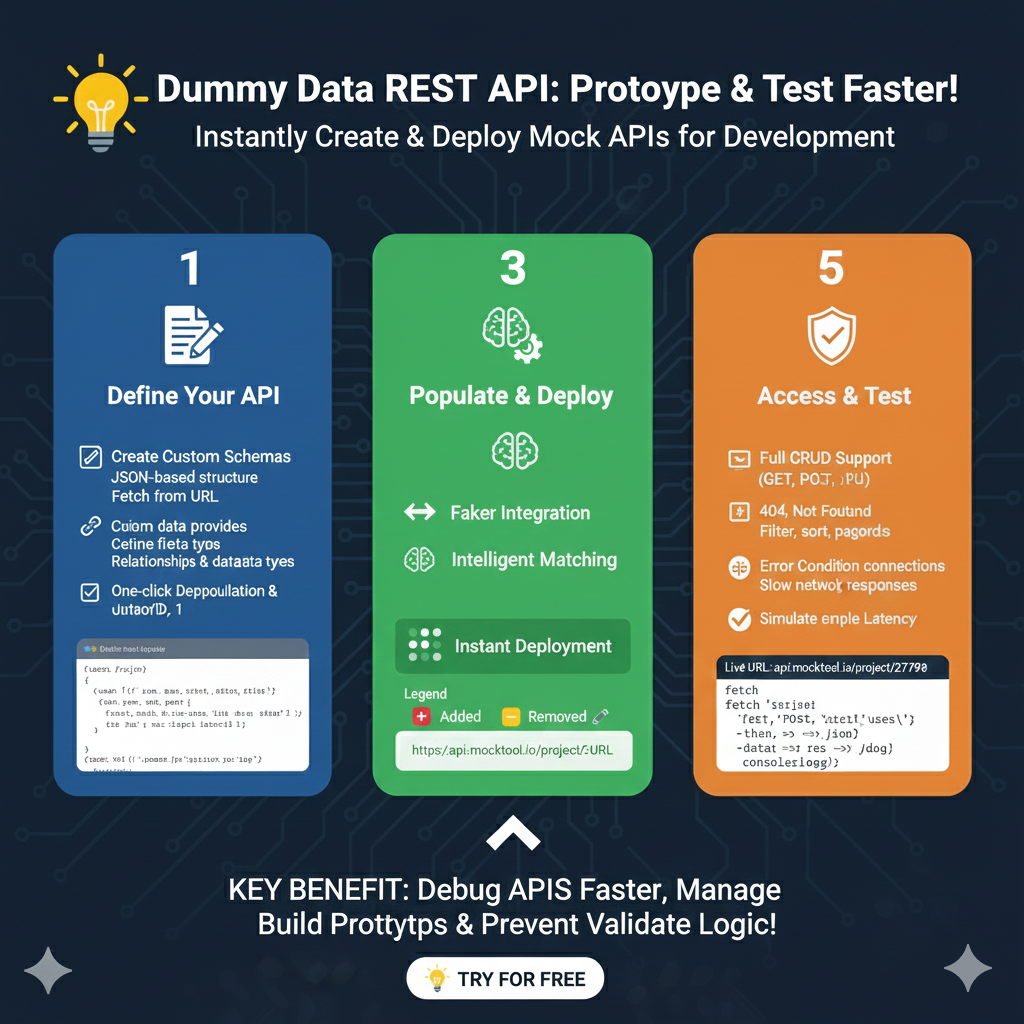
The infographic titled “Dummy Data REST API: Prototype & Test Faster!” outlines a streamlined process for creating and deploying mock APIs to accelerate development and testing.
🚀 Mock API Development Workflow
The process is broken down into three logical phases that enable developers to build and validate logic without a functional backend:
1. Define Your API (Blue)
This stage focuses on establishing the core structure of your endpoints:
- Custom Schemas: Create JSON-based structures that can be fetched from a URL or defined manually.
- Data Customization: Define specific field types, established relationships, and diverse data types to match your real-world application needs.
- Rapid Deployment: Features one-click deployment capabilities to get your mock endpoints live instantly.
2. Populate & Deploy (Green)
This section explains how the mock API is filled with realistic data and moved to a live state:
- Faker Integration: Utilize intelligent tools to automatically generate realistic names, addresses, and other placeholder information.
- Intelligent Matching: The system ensures that the generated data correctly aligns with the schema defined in the first step.
- Instant URL Generation: Provides a live URL (e.g.,
api.mocktool.io/project/27798) that your frontend can immediately start calling.
3. Access & Test (Orange)
The final phase covers the practical application of the mock API in your testing environment:
- Full CRUD Support: The API supports standard methods including GET, POST, PUT, and DELETE.
- Negative Testing: Simulate error conditions such as 404 Not Found, as well as common features like filtering, sorting, and pagination.
- Performance Simulation: Test how your application handles slow network responses by simulating endpoint latency.
learn for more knowledge
Json Parser->Jackson JSON Parser: A Comprehensive Guide to Parse JSON for Java Developers – json parse
json web token-> python jwt: How to Securely Implement jwt in python – json web token
Json Compare ->How to Effectively Use a JSON Comparator Online: Your Ultimate Guide to JSON Compare, and JSON Diff – online json comparator
Mykeywordrank->small seo tool for keyword rank checking and local rank checker – keyword rank checker
Leave a Reply