In modern web development, frontend teams often find themselves waiting for backend apis to be ready. This dependency can slow down the entire development process, leading to delays and frustration. Thankfully, there’s an elegant solution: a fake api json server. This powerful tool allows you to simulate a REST api, providing mock apis for your frontend application instantly. Think of it as a custom, local version of jsonplaceholder that you can control.
What is a fake api json server?
A fake api json server is essentially a lightweight, local api server that serves json data based on a simple db json file. It allows developers to create api endpoints with a full REST structure with zero coding in minutes. It’s a free and easy way to manage fake json for:
- Frontend development when the fake backend isn’t ready.
- Prototyping new features using dummy json.
- Testing api responses and integrations.
- Demonstrating application functionality with mock data.
The most popular tool for this is json-server, an npm package that provides a full REST api from a single json file.
Why Use a fake json server or fake api?
Using a fake api json server brings several benefits to your development workflow:
- Accelerated Frontend Development: Frontend developers can start building and testing their UI components immediately, without waiting for backend apis.
- Independent Development: Decouple frontend and server development, allowing teams to work in parallel.
- Consistent Testing Environment: Create predictable data for unit and integration tests, ensuring a reliable response.
- Rapid Prototyping: Quickly spin up a mock api for concept validation or client demonstrations.
- Reduced Backend Load: Avoid burdening development api server environments with constant testing requests.
How to create a fake json api (Step-by-Step)
Setting up json-server fake-api is incredibly straightforward. Follow this guide to get your localhost server running.
Step 1: Prerequisites (Node.js and npm)
Ensure you have Node.js and npm installed. You can check your version in the terminal:
Bash
node -v
npm -v
Step 2: Install json-server
Install the json-server fake-api tool globally to make it available as a mock tool from any directory:
Bash
npm install -g json-server
Step 3: Create Your db json with dummy json
In your project directory, create a file named db.json. This file acts as your mock database. Here is an example containing posts, comments, and a user profile:
JSON
{
  "posts": [
    { "id": 1, "title": "fake json server tutorial", "author": "dev-peer" },
    { "id": 2, "title": "How to use mock apis", "author": "user1" }
  ],
  "comments": [
    { "id": 1, "body": "Great tool!", "postId": 1 }
  ],
  "profile": { "name": "developer" }
}
Step 4: Launch Your api server on localhost
Navigate to your project directory and start the fake json-server using the following command:
Bash
json-server --watch db.json
The server will usually start on localhost:3000. You can now access your routes:
http://localhost:3000/postshttp://localhost:3000/comments
Testing Your api responses
Now you can make standard HTTP requests to your fake api. Whether you are fetching an item or creating a new user, json-server handles it:
- GET all posts:
fetch('http://localhost:3000/posts') - POST a new item:
JavaScript
fetch('http://localhost:3000/posts', {
  method: 'POST',
  headers: { 'Content-Type': 'application/json' },
  body: JSON.stringify({ title: 'new post', author: 'tester' })
})
Advanced Features
According to the official docs, you can also use:
- Filtering:
localhost:3000/posts?title=json-server - Pagination:
localhost:3000/posts?_page=1&_limit=5 - Sorting:
localhost:3000/posts?_sort=id&_order=desc
Conclusion
A fake api json server is an invaluable asset for any frontend developer. By providing a quick and easy way to create mock apis, it drastically improves development speed and testing efficiency. Don’t let backend dependencies slow you down; embrace the power of a fake json-server to boost your productivity today!
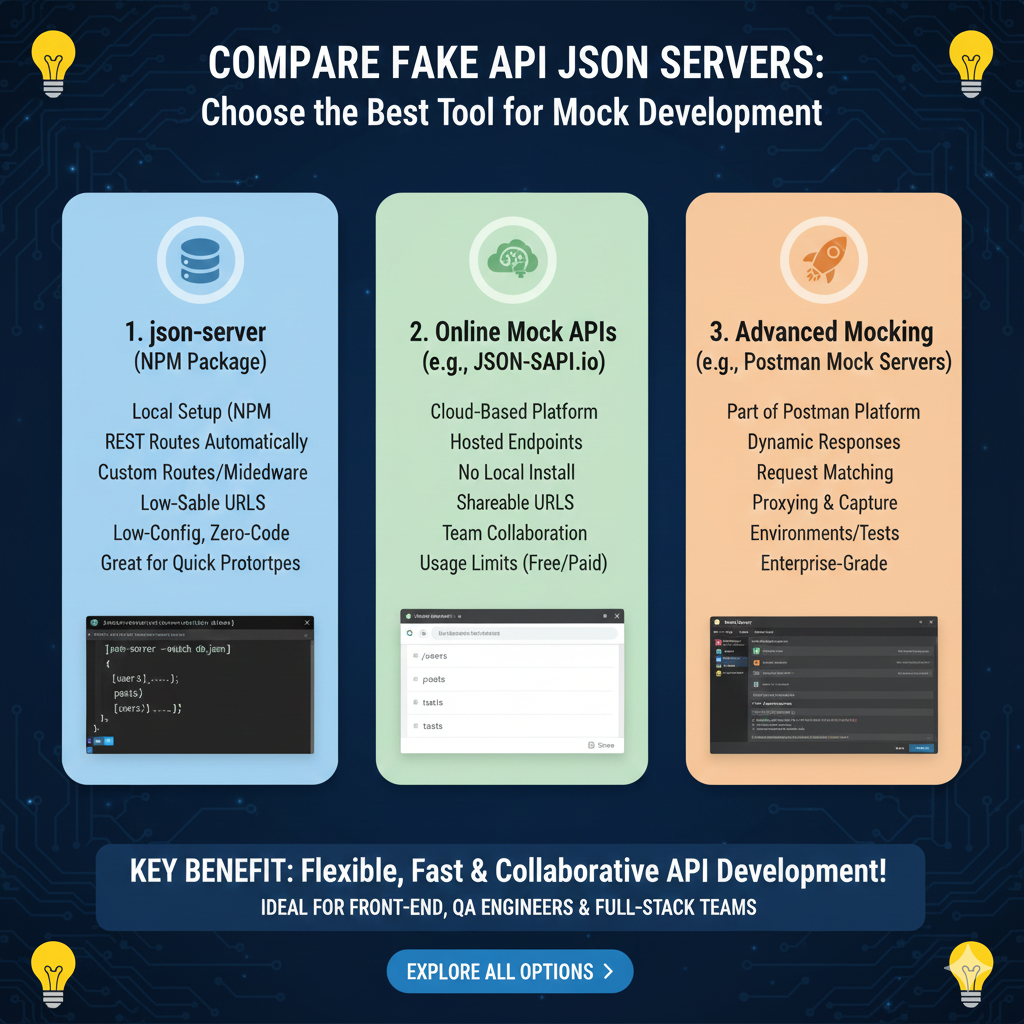
The infographic “COMPARE FAKE API JSON SERVERS: Choose the Best Tool for Mock Development” provides a strategic comparison of popular methods for simulating backend services to accelerate front-end and full-stack development.
🛠️ Selecting the Right Mocking Tool
The infographic categorizes mock API solutions into three distinct tiers based on setup complexity and feature depth:
1. json-server (NPM Package)
This is an ideal choice for developers who need a local, highly customizable environment:
- Local Setup: Installs via NPM and runs directly on your machine.
- Automatic REST Routes: Generates full CRUD endpoints automatically from a simple JSON file.
- Customization: Supports custom routes and middleware for specific logic requirements.
- Zero-Code Prototyping: Excellent for quick prototypes that require low configuration.
2. Online Mock APIs (e.g., JSON-SAPI.io)
These cloud-based platforms are built for accessibility and team-wide collaboration:
- Hosted Endpoints: No local installation is required, providing instant availability.
- Collaboration Ready: Features shareable URLs and team management tools.
- Cloud Convenience: Accessible from any environment without hardware dependencies.
- Flexible Access: Often provides a mix of free and paid usage limits to suit different project scales.
3. Advanced Mocking (e.g., Postman Mock Servers)
This tier is designed for enterprise-grade needs and complex API lifecycles:
- Platform Integration: Part of the broader Postman ecosystem for unified API development.
- Dynamic Responses: Capable of generating sophisticated, logic-based responses.
- Traffic Capture: Includes proxying and capture features to mirror real-world data patterns.
- Test Integration: Seamlessly connects with automated testing environments and CI/CD pipelines.
learn for more knowledge
Mykeywordrank-> Search for SEO: The Ultimate Guide to Keyword Research and SEO Site Checkup – keyword rank checker
json web token->React JWT: How to Build a Secure React Application with JSON Web Token – json web token
Json Compare ->Compare JSON Data Using a JSON Compare Tool for JSON Data – online json comparator
json parser-> How to Parse json format parser: A Comprehensive Guide – json parse
Leave a Reply