In the fast-paced world of web development, efficiency is key. Often, front-end developers find themselves waiting for the back-end API to be ready, leading to delays. This is where Dummy JSON APIs come to the rescue! This guide will walk you through what they are, why you should use them, and crucially, how to integrate them into your development workflow to speed things up and enhance your testing.
What is a Dummy JSON API?
A Dummy JSON API is essentially a mock server that provides predefined JSON data over HTTP, mimicking a real API. It’s designed for development, testing, and prototyping when a live back-end is unavailable or impractical to use. Instead of connecting to a real database, it serves static or semi-dynamic data, allowing front-end developers to build and test user interfaces independently.
Why Use Dummy JSON APIs?
Leveraging dummy JSON APIs offers several significant advantages:
Rapid PrototypingQuickly build out UI components and pages without waiting for the back-end. This accelerates the initial design and development phase.
Front-End Development Without Back-End DependencyTeams can work in parallel. Front-end developers can start building features immediately, even if the back-end API is still under construction or not fully stable.
Effective Testing and DebuggingDummy data allows you to simulate various scenarios, including empty states, error responses, and different data structures, making it easier to test edge cases and debug your front-end logic.
Learning and ExperimentationFor beginners, dummy APIs provide a safe sandbox to practice making API requests and handling responses without affecting a real system.
How to Get Started with Dummy JSON APIs
Let’s dive into the practical steps of using dummy JSON APIs.
1. Choosing a Dummy JSON API Provider
Several excellent services offer free dummy JSON APIs:
- DummyJSON.com: Offers a wide range of resources like products, users, posts, carts, and more, with support for searching, filtering, and pagination.
- JSONPlaceholder: A classic choice for simple mock REST APIs, providing fake data for posts, comments, albums, photos, and users.
- Reqres.in: A hosted REST API that provides a simple way to get mock data for client-side use, supporting GET, POST, PUT, DELETE.
2. Making Your First Request
Let’s use DummyJSON.com as an example to fetch a product. You can do this with JavaScript’s fetch API:
fetch('https://dummyjson.com/products/1')
  .then(res => res.json())
  .then(json => console.log(json));
This code sends a GET request to retrieve the product with ID 1 and logs the JSON response to your console. The output would look something like this:
{
  "id": 1,
  "title": "iPhone 9",
  "description": "An apple mobile which is nothing like apple",
  "price": 549,
  "discountPercentage": 12.96,
  "rating": 4.69,
  "stock": 94,
  "brand": "Apple",
  "category": "smartphones",
  "thumbnail": "https://i.dummyjson.com/data/products/1/thumbnail.jpg",
  "images": [
    "https://i.dummyjson.com/data/products/1/1.jpg",
    "https://i.dummyjson.com/data/products/1/2.jpg",
    "https://i.dummyjson.com/data/products/1/3.jpg",
    "https://i.dummyjson.com/data/products/1/4.jpg",
    "https://i.dummyjson.com/data/products/1/thumbnail.jpg"
  ]
}
3. Working with Collections and Filtering
Most dummy APIs allow you to fetch lists of resources and apply filters. For instance, to get all products:
fetch('https://dummyjson.com/products')
  .then(res => res.json())
  .then(json => console.log(json));
To search for products:
fetch('https://dummyjson.com/products/search?q=phone')
  .then(res => res.json())
  .then(json => console.log(json));
4. Simulating CRUD Operations (Create, Read, Update, Delete)
While dummy APIs are primarily for reading data, some allow you to simulate other HTTP methods (POST, PUT, DELETE) for testing purposes. Note that changes are usually not persisted on the server.
Creating a new resource (POST)
fetch('https://dummyjson.com/products/add', {
  method: 'POST',
  headers: { 'Content-Type': 'application/json' },
  body: JSON.stringify({
    title: 'New Product X',
    description: 'A fantastic new product for testing',
    price: 99.99
  })
})
  .then(res => res.json())
  .then(json => console.log(json));
Updating a resource (PUT/PATCH)
fetch('https://dummyjson.com/products/1', {
  method: 'PUT', /* or PATCH */
  headers: { 'Content-Type': 'application/json' },
  body: JSON.stringify({
    title: 'Updated iPhone 9'
  })
})
  .then(res => res.json())
  .then(json => console.log(json));
Deleting a resource (DELETE)
fetch('https://dummyjson.com/products/1', {
  method: 'DELETE',
})
  .then(res => res.json())
  .then(json => console.log(json));
Best Practices for Using Dummy JSON APIs
Do Not Use in ProductionDummy APIs are for development and testing. Never expose them to production environments, as they are not designed for security, scalability, or persistence.
Match Real API StructureWhen prototyping, try to align the dummy JSON structure as closely as possible to your anticipated real API. This minimizes refactoring later on.
Consider Local Mocking ToolsFor more control over responses (e.g., specific error codes, delays), consider local mocking tools like Mockoon, Mirage JS, or even setting up a simple Node.js server with Express.
Conclusion
Dummy JSON APIs are invaluable tools in a developer’s arsenal. By understanding how to effectively utilize them, you can significantly accelerate your front-end development, improve testing coverage, and create a more robust application. Embrace these powerful resources to streamline your workflow and focus on building amazing user experiences!
for DummyJSON API
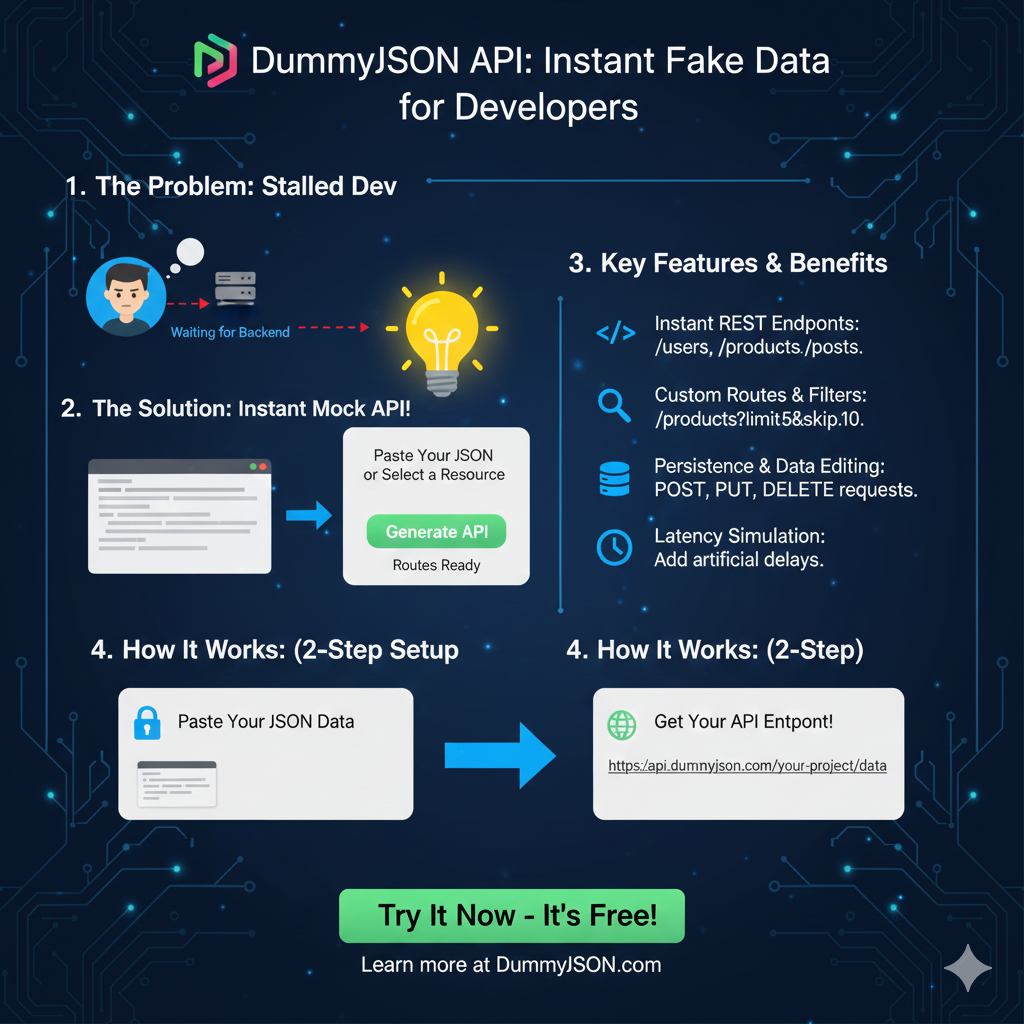
This infographic explains how the DummyJSON API service helps developers create and use mock JSON data immediately for development and testing.
1. The Problem & The Solution 💡
| Section | Description |
| 1. The Problem: | Stalled Dev. The developer is Waiting for Backend API endpoints to be completed, causing development delays. |
| 2. The Solution: | Instant Mock API!. Developers can Paste Your JSON or Select a Resource to immediately get Routes Ready. |
3. Key Features & Benefits ✨
The service offers powerful features that mimic a fully functional backend API, crucial for comprehensive frontend testing.
- Instant REST Endpoints: The API automatically generates standard endpoints like
/users,/products, and/postsbased on the data structure. - Custom Routes & Filters: It supports query parameters for advanced filtering and pagination, such as
/products?limit=5&skip=10. - Persistence & Data Editing: The mock data can be updated dynamically via standard REST methods like POST, PUT, and DELETE requests.
- Latency Simulation: The tool allows developers to add artificial delays to simulate realistic network latency.
4. How It Works: (2-Step Setup) ⚙️
The process is designed for speed and simplicity, allowing developers to get a live API endpoint in minutes.
- Step 1: Paste Your JSON Data. The user provides the desired data structure.
- Step 2: Get Your API Endpoint!. The tool instantly generates a live, persistent URL, such as
https://api.dummyjson.com/your-project/data.
learn for more knowledge
Json Parser ->What Is Node.js Body Parser? express body-parser (Explanation) – json parse
Json web token ->What Is Auth0 JWT, JSON Web Token – json web token
Json Compare ->Online Compare JSON, JSON Compare, JSON Compare Tool, JSON Diff – online json comparator
Mykeywordrank ->What Is Seo Rank and seo analyzer – keyword rank checker
Leave a Reply