Introduction to Dummy API JSON
In modern web and application development, it’s often essential to test frontend components or integrate with APIs even before the backend is fully developed. This is where dummy API JSON comes into play, offering a powerful solution to accelerate your development workflow. This process relies on creating or fetching fake JSON to handle requests. But what exactly is this fake API, and more importantly, how to effectively use it for your project?
What is a Dummy API JSON?
A dummy API JSON, also known as a mock API or fake API, is a service that mimics the behavior of a real API by providing predefined JSON responses. It allows developers to simulate server responses without needing a functional backend. This is incredibly useful for:
- Frontend development
- Mobile app development
- Automated testing with consistent test data
- Rapid prototyping and showcasing features without real data
By providing dummy data in a response JSON format, the dummy API acts as a reliable stub-api for your frontend application, speeding up the overall development cycle.
How to Use Dummy API JSON API for Development and Testing
Using dummy API JSON is straightforward and can significantly boost your productivity. Here’s a step-by-step guide:
1. Choose a Fake API Service or Tool
There are several excellent online services and local tools available to generate JSON data and APIs:
| Tool/Service | Type | Primary Use Case |
| JSONPlaceholder | Online Fake API | A popular free fake online REST API providing posts, users, and more. |
| ReqRes.in | Online API | Hosted REST-API ready to respond to your AJAX requests (often returns a res object). |
| DummyJSON | Online API | Provides routes for various products, users, and posts data. (e.g., https://dummyjson.com/products/1) |
| Mockaroo | Data Generater | Allows you to generate realistic, customizable dummy data (including email, names, and custom formats) and export it as JSON. |
typicode/json-server | Local Tool | A local tool that lets you create a full fake REST API in less than a minute from a single JSON file. |
2. Understand the API Endpoints and Data Structure
Most dummy API services provide documentation or examples of their available endpoints and the JSON structure they response with. For instance, JSONPlaceholder offers resources like posts, comments, albums, photos (image links), and users.
Example JSON response from JSONPlaceholder for a post:
JSON
{
  "userId": 1,
  "id": 1,
  "title": "sunt aut facere repellat provident occaecati excepturi optio reprehenderit",
  "body": "quia et suscipit\nsuscipit recusandae consequuntur expedita et cum\nreprehenderit molestiae ut ut quas totam\nnostrum rerum est autem sunt rem eveniet architecto"
}
3. Integrate into Your Application
Once you know the endpoints and expected data, you can integrate them into your frontend application using standard HTTP request libraries. This allows you to test how your UI handles the body JSON.
Example using JavaScript Fetch API:
JavaScript
fetch('https://jsonplaceholder.typicode.com/posts/1')
  .then(response => response.json())
  .then(json => console.log(json));
4. Simulate Different Scenarios
Dummy APIs are excellent for testing various scenarios:
- Successful data retrieval: Fetching lists or single items like products or users.
- Error handling: Some services allow simulating error responses (e.g., 404 Not Found, 500 Internal Server Error) to test your application’s error UI.
- Data creation, update, and deletion: While changes on public dummy APIs are often not persisted, they still allow you to test your application’s logic for sending a body JSON and handling the resulting response.
Benefits of Using Dummy API JSON
Embracing dummy APIs brings numerous advantages to your development process:
- Parallel Development: Frontend and backend teams can work independently using consistent test data.
- Faster Iteration: No waiting for backend changes; rapid prototyping is possible using JSON Server or online alternatives.
- Robust Testing: Easily create consistent, predictable fake json to power unit, integration, and UI tests.
- Reduced Dependencies: Isolate frontend development from backend stability issues.
- Cost-Effective: Avoid consuming real API quotas or incurring server costs during early development.
Conclusion
Dummy API JSON is an indispensable tool for modern developers, significantly streamlining the development and testing phases. By understanding how to leverage services like JSONPlaceholder, Mockaroo, DummyJSON, or local tools like JSON Server, and focusing on reliable response handling, you can build more efficiently, test more thoroughly, and accelerate your project’s time to market. Start integrating these fake json tools into your workflow today and experience the difference!
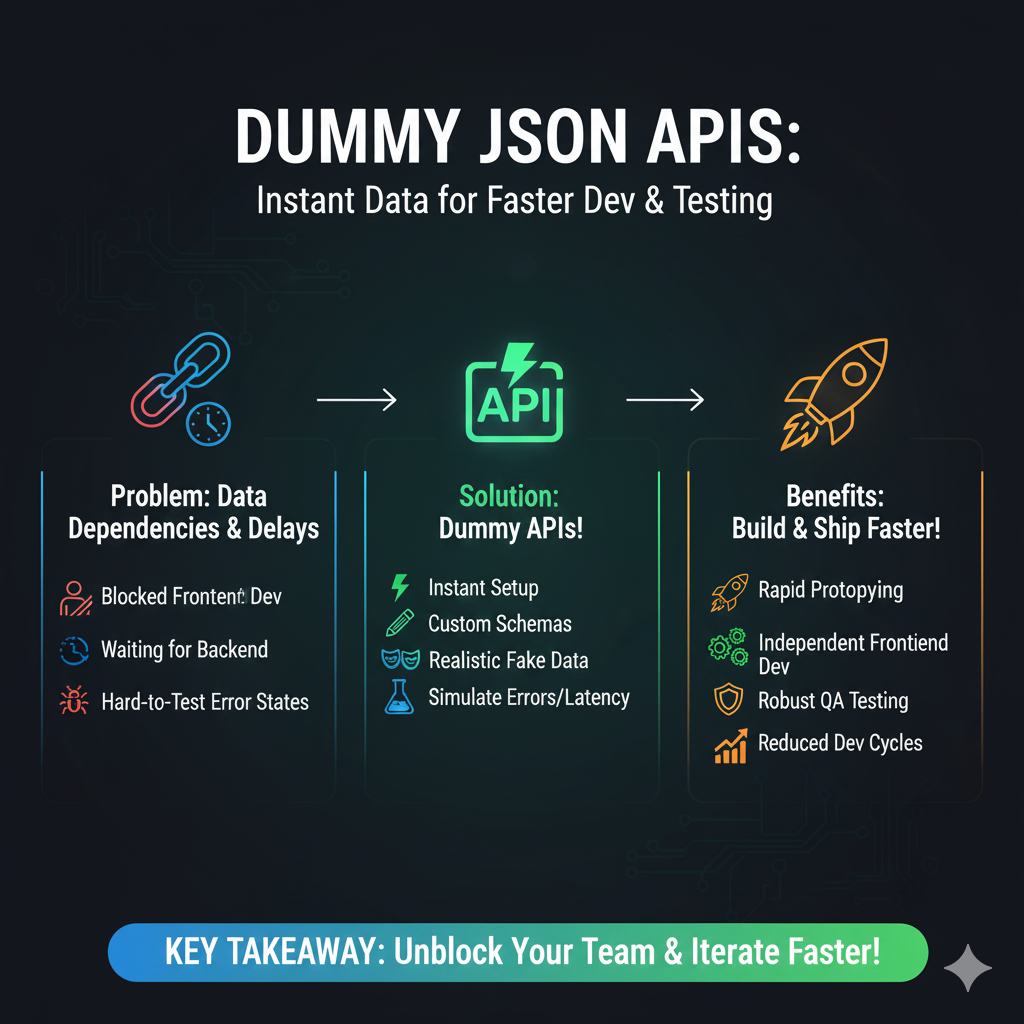
The image is an infographic titled “DUMMY JSON APIS: Instant Data for Faster Dev & Testing”. It uses a three-column structure to clearly outline the problem dummy APIs solve, the solution they provide, and the resulting benefits for development teams.
💡 Dummy JSON APIs: Instant Data for Faster Dev & Testing
1. Problem: Data Dependencies & Delays (Blue)
This column highlights common development roadblocks that occur when waiting for a backend:
- Blocked Frontend Dev: Frontend developers cannot proceed without the necessary API data.
- Waiting for Backend: Project timelines are delayed while the backend infrastructure is being built.
- Hard-to-Test Error States: It’s difficult to consistently reproduce specific error responses (like 404s or 500s) for testing.
2. Solution: Dummy APIs! (Green)
This column details the key features and capabilities of mock API services:
- Instant Setup: APIs can be set up immediately.
- Custom Schemas: Users can define the exact data structure they need.
- Realistic Fake Data: The APIs generate data that looks authentic (using “faker” functions).
- Simulate Errors/Latency: Developers can intentionally introduce errors or network delays for realistic testing.
3. Benefits: Build & Ship Faster! (Orange)
This column lists the positive outcomes of using a dummy API solution:
- Rapid Prototyping: Quickly build and test new features.
- Independent Frontend Dev: Frontend teams are unblocked from backend dependencies.
- Robust QA Testing: Quality assurance teams can systematically test all data scenarios.
learn for more knowledge
Json parser-> How to Find the Fastest JSON Parser for Peak Performance – json parse
Json web token ->Spring Security JWT: Your Comprehensive Guide to JSON Web Tokens – json web token
Json Compare ->Compare Two JSON Files Online Easily and Accurately – online json comparator
Mykeywordrank-> Search Page Optimization: Maximizing Visibility and Clicks on the SERP (A Key to Your Site’s Success) – keyword rank checker
Leave a Reply