Introduction to json and dummy json rest api Services
In the modern world of web development, especially when building front-end applications, you often find yourself waiting for the back-end rest api to be ready. This waiting game can significantly slow down your cycle. This is where a dummy json rest api or fake rest api comes into play. These services provide pre-made test data in a json format, allowing developers to work in parallel with their api server team.
Using a dummy api lets you simulate a real response without needing a functional server, database, or complex authentication. These mock tools are invaluable for a restapiexample during prototyping and performing robust api testing.
Why Use a dummy json rest api?
1. Accelerate Front-End Development
A fake api enables front-end teams to start coding without depending on the api server. You can define the expected json data structure and immediately begin building your interface, integrating with the actual rest api later.
2. Seamless Prototyping with test data
Quickly generate user interfaces and demonstrate functionalities to stakeholders. Using a fake rest api makes your prototypes feel more complete. You can point your application to a specific endpoint to receive a realistic response body that mimics production responses.
3. Robust api testing and mock server Usage
From unit tests to integration tests, a mock server provides consistent and predictable test data. You can simulate various responses, including successful states, error codes, and different json rest variations to ensure your app handles all edge cases.
Popular fake api and json server Providers
Several excellent services offer a fake rest api that you can use right away:
- JSONPlaceholder: A free online rest api perfect for a dummy restapiexample. It provides placeholder resources like posts (100 resources) and comments (500 resources).
- Reqres.in: A great api server simulator that provides basic CRUD operations and a clear response body for user data.
- MockAPI.io: Allows you to generate your own custom mock endpoints. This is perfect when you need a specific json rest structure not found in standard docs.
How to Fetch Data from a json rest endpoint
Fetching data from a dummy api is identical to calling a live rest api. Below is a restapiexample using the JavaScript Fetch API.
JavaScript Fetch restapiexample
When you call a placeholder endpoint, you can inspect the response and response body to verify your front-end logic.
JavaScript
// Example using fetch API with a fake rest api endpoint
fetch('https://jsonplaceholder.typicode.com/posts/1')
  .then(responses => responses.json())
  .then(json => {
    console.log("Response Body:", json); // View the dummy json data
  })
  .catch(error => console.error('Error during api testing:', error));
Using json server for Local Development
If you need more control, you can use a json server to create a mock server on your own machine. This allows you to generate a local fake rest api by simply pointing the server to a json file.
Conclusion
A dummy json rest api is an indispensable tool for modern developers. By leveraging a fake rest api, you can work more efficiently, perform better api testing, and build robust applications without waiting for a live api server. Whether you choose a placeholder service like JSONPlaceholder or a custom mock server, these tools will significantly streamline your json data workflow.
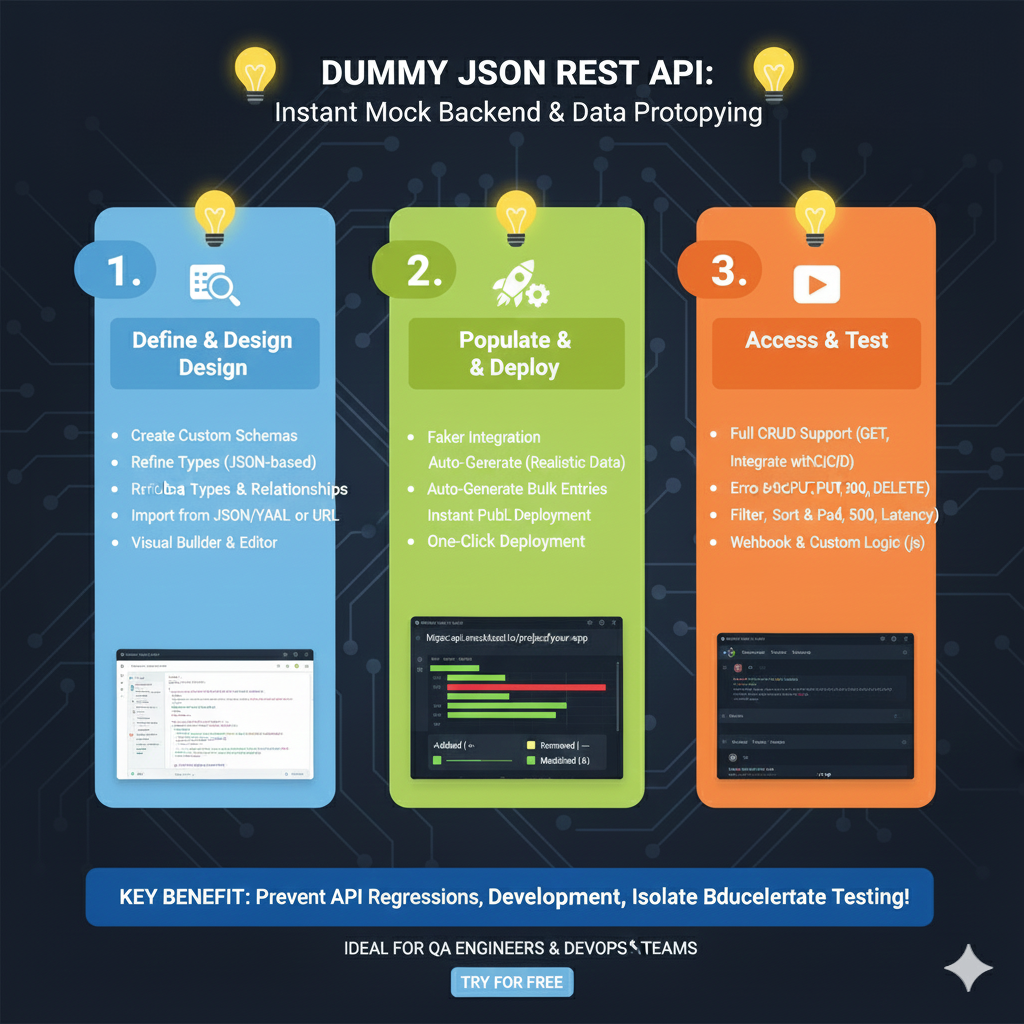
Mock Backend Development Workflow
This tool allows QA Engineers and DevOps teams to isolate testing and prevent regressions by using controlled data environments.
1. Define & Design (Blue)
This phase focuses on establishing the architecture of your mock data:
- Custom Schema Creation: Users can build tailored schemas from scratch or import existing definitions from JSON/YAML files and URLs.
- Structured Modeling: Refine data types and establish complex Relationships between different data entities.
- Visual Interface: Utilize a built-in Visual Builder & Editor to manage API structures without writing boilerplate code.
2. Populate & Deploy (Green)
This section explains how to fill the API with data and make it accessible:
- Smart Data Generation: Use Faker Integration to auto-generate realistic placeholder data and create bulk entries instantly.
- Rapid Launch: Features One-Click Deployment to a public endpoint for immediate use in frontend projects.
- Visual Tracking: Monitor data changes through a Visual Legend that identifies added, removed, or modified fields.
3. Access & Test (Orange)
The final stage covers interacting with the mock server to validate application logic:
- Complete Protocol Support: Provides Full CRUD Support including standard HTTP methods like GET, POST, PUT, and DELETE.
- Advanced Testing Tools: Simulate real-world scenarios such as Network Latency, pagination, filtering, and sorting.
- Error & Logic Simulation: Validate how an app handles failure by triggering specific error codes (e.g., 404, 500) or using Webhooks & Custom JS Logic.
learn for more knowledge
Mykeywordrank-> SEO Search Optimization-Mastering Search Engine Optimization for Unbeatable Google Rankings – keyword rank checker
json web token->jwt header-The Complete Guide to json web token Metadata – json web token
Json Compare ->json online compare- The Ultimate Guide to json compare online, json diff, and compare online tools – online json comparator
json parser->How to json array parser- A Comprehensive Guide for Developers – json parse
Leave a Reply