A JSON Fake API is a mock or dummy API that provides fake JSON data for testing, learning, and development. Instead of using a real backend server, developers use a fake API to simulate real API responses.
This helps you build and test applications quickly without needing a live database or real data.
✨ Why JSON Fake API Is Used
- To test front-end applications
- To learn how APIs work
- To practice fetching data using JavaScript, React, Angular, etc.
- To develop UI before backend is ready
- To avoid breaking real production APIs
📌 What JSON Fake APIs Usually Provide
Fake APIs typically include ready-made JSON data like:
- Products
- Users
- Posts
- Comments
- Photos
- Auth examples
Example:
{
  "id": 1,
  "title": "Sample Product",
  "price": 29.99
}
🚀 Benefits of Using JSON Fake API
- No signup required
- Fast and simple to use
- Great for beginners learning APIs
- Helps test CRUD operations (GET, POST, PUT, DELETE)
- Zero server setup
🧑💻 Who Uses JSON Fake APIs?
- Front-end developers
- Students
- UI/UX engineers
- Mobile app developers
- API testers
🎯 Final Summary
A JSON Fake API provides ready-made fake JSON data so you can test applications, learn APIs, and build projects without needing a real backend. It’s perfect for quick prototyping and development.
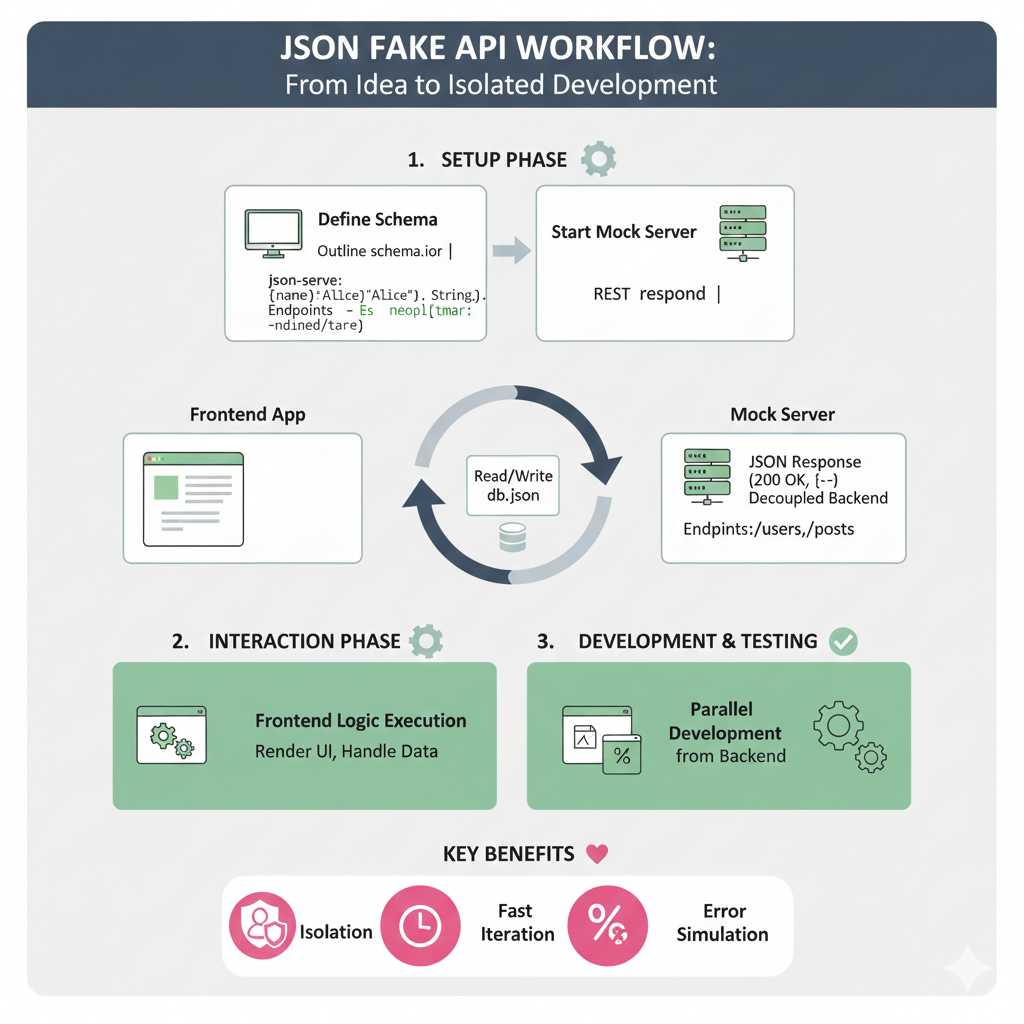
Based on the image provided (image_c4c0fd.jpg and image_c4c45c.jpg are similar), here is the structured content for the “JSON FAKE API WORKFLOW: From Idea to Isolated Development” infographic.
⚙️ Content for JSON FAKE API WORKFLOW Infographic
This infographic illustrates the three primary phases of using a fake API to enable fast, isolated frontend development.
1. SETUP PHASE 🛠️
This phase prepares the mock data and starts the local server.
| Step | Action | Description/Details |
| Define Schema | Outline the data structure. | Use a schema definition (like schema.ior or JSON) to define keys and data types (e.g., (name): 'Alice'(Alice), String.). |
| Start Mock Server | Begin serving the defined data. | Uses a command like json-server --watch db.json to respond to REST requests. Endpoints are automatically generated (e.g., /users, /posts). |
2. INTERACTION PHASE 🔄
This phase shows how the frontend and mock server communicate during development.
- The Frontend App sends requests to the Mock Server.
- The Mock Server handles data: it can Read/Write db.json.
- The Mock Server sends a JSON Response (e.g.,
200 OK) and acts as a Decoupled Backend.
3. DEVELOPMENT & TESTING ✅
This phase highlights the development work enabled by the fake API.
- Frontend Logic Execution: The application can fully Render UI and Handle Data received from the mock server.
- Parallel Development: Frontend development is Decoupled from Backend and can proceed simultaneously.
KEY BENEFITS ❤️
| Benefit | Icon | Description |
| Isolation | Lock/Security | Develop without dependencies on the real backend. |
| Fast Iteration | Clock/Speed | Quickly change data and test scenarios. |
| Error Simulation | Percentage/Checkmark | Easily test failure states (e.g., HTTP 500). |
Leave a Reply